Executive Summary
July 4, 2026 saw the official launch of Sec. 530 "Trump Accounts" (TAs), a new type of 'starter' retirement account designed to be opened and funded on behalf of minor children so they can start accumulating tax-deferred retirement savings at an early age. Under the rules for TAs, parents and other individuals, employers, and government and charitable organizations can make contributions to a child's TA up until the year before their 18th birthday, after which the account effectively converts into a traditional IRA – giving the account's owner an incentive not to touch the account for many years, since distributions prior to age 59 ½ will be subject to a 10% penalty tax.
But although TAs may be similar to standard IRAs in many aspects (and effectively become IRAs after the pre-age-18 "growth period" ends), the process of opening and funding TAs is very different. Because unlike IRAs, which can be opened at any major broker-dealer or custodian and have no limits on the number of different IRAs that any individual can have open at one time, TAs can only be opened in a single location (a website and app administered by the retail broker-dealer Robinhood), and while other institutions will eventually be able to offer TAs of their own, they will only be available for 'rollover' purposes (i.e., to transfer into once the initial account is opened at Robinhood's site).
The process of opening a TA starts by filing IRS Form 4547, a form that can be filled out (generally by a parent or legal guardian) either on the government's official Trump Account app, online via the IRS's website, or as an actual tax form to be filed along with the account opener's tax return. Next, after the IRS approves the Form 4547, the account opener must 'activate' the account on the Robinhood-administered website, www.trumpaccount.com. Finally, when the account is open, the parent can contribute and invest funds on the child's behalf (with the only current investment option being an S&P 500 index ETF, although broader U.S. equity funds will purportedly be available in the future).
After the TA has been opened, funded, and invested, the account can be kept at Robinhood or, likely starting sometime in 2027, transferred to a different custodian. However, once the account beneficiary reaches age 18, the TA will be automatically rolled over to a traditional IRA, at which point the responsibility for choosing investments, tracking the account basis (since there will likely be a mix of 'pre-tax' and 'after-tax' funds in the account), and designating a beneficiary shifts to the now-18-year-old account owner. In other words, at age 18, the TA beneficiary will 'get' not just control over the account and its funds, but also a new set of responsibilities for maintaining it as they cross into adulthood.
The key point is that although TAs may look in some ways like the IRAs that many people are familiar with, the real mechanics of opening, funding, and maintaining a TA (not to mention the eventual 'handoff' to the beneficiary at age 18) are much different than what many parents have likely encountered. For financial advisors, it's worthwhile to understand how these mechanics work and where parents are likely to get tripped up along the way – because while not every parent will want to open a TA for their children (since other options like 529 plans or UTMA accounts might be a better fit for their goals), the ones who do will appreciate their advisor being able to walk them through the process and get them started smoothly on saving for the next generation!
 |
And if you want to go deeper on this topic, hear directly from the author on the Financial Advisor Technician podcast . |

Listen To The Financial Advisor Technician Podcast On This Topic




Episode Shownotes And Transcript
Click to expand transcript and show notes↓↓
Shownotes:
- Ben Henry-Moreland: LinkedIn | Website
- Why Taxable Custodial Accounts Are Better Than OBBBA "Trump Accounts" For Kids' Savings, by Ben Henry-Moreland
- TrumpAccounts.gov (to file Form 4547)
- TrumpAccount.com (to create investment account)
- Become A Kitces.com Premier Member
Transcript:
Adam: Hello, and welcome to the first episode of the "Financial Advisor Technician" podcast. I'm your host, Adam Van Deusen, a financial planning nerd here at Kitces.com. On this podcast, I'll be speaking with some of the sharpest minds in financial planning to discuss a broad range of technical topics, from retirement and tax planning to estate planning, investment planning, client communication, and more. As your host, my goal is to both help you better understand the particular topic of each episode and to identify how you might apply it in your own practice, all in a weekly 30-minute episode.
To kick things off, the topic of today's episode is the Section 530A Trump Account, a newly available account that helps children get a head start on retirement saving. Notably, not only does this account type come with its own unique rules and potential planning strategies, but it also has its own account opening process that is very different than that of other investment accounts. And with these accounts being much talked about in the news, many financial advisors are likely to get questions from clients about how these accounts work, whether they're the best option for their goals, and what they need to do to open one.
To help us dig deeper into this topic, I'm joined today by my colleague Ben Henry-Moreland, a senior financial planning nerd here at Kitces.com, to discuss the ins and outs of Trump Accounts, as well as his experience actually opening these accounts for his two children, which offer lessons that advisors can apply with their own clients. So welcome, Ben, and thanks for joining us here on the "Financial Advisor Technician" podcast.
Ben: Hello, Adam. Thank you so much for having me.
What Trump Accounts Are And How They Work [1:42]
Adam: Great. So, to start, perhaps you could provide a quick rundown of just what Trump Accounts actually are and how they work.
Ben: Yeah. So what I would call, in a nutshell, a Trump Account, you see different names for a Trump Account or a 530A account based on the section of the code they're in, I kind of just call them TAs sometimes, Trump Account, TA, whatever you want to call them, though, what they are, in a nutshell, essentially, is a starter retirement account for children. So you think of a standard individual retirement account, IRA. Those usually need earned income to contribute. Someone needs to actually be working a job and earning income to be able to contribute to an IRA. So generally, those are not available for children unless they're old enough, 13, 14, 15 years old, to start working and contribute to an IRA of their own.
So under the One Big Beautiful Bill Act, the OBBBA last year, these were created as a new special type of IRA, essentially, that have these rules governing what happens during, when an individual is a child, a minor child before the age of 18, where they can contribute to these accounts or have money contributed on their behalf by parents, grandparents, etc. And at the same time, they cannot withdraw any money up until they hit the year that they turn age 18. So essentially, you've got this dividing point here at the point where someone hits the year that they turn age 18, January 1st of their age 18 year. Before that, you have these special rules where people can make contributions. They can contribute up to $5,000 a year. Up to $2,500 of that can be coming from an employer.
There are some very specific rules around who can apply or who can contribute how much money. But in a nutshell, contributions can be made up until age 18. And after that, once they hit that age 18 year, then it essentially becomes an IRA. It just more or less turns into a standard traditional IRA. This money is in there. There's a combination of pre-tax and after-tax money, and it gets treated as an IRA going forward. So it's really essentially just a retirement account that can be contributed to when someone is still a minor child.
Adam: Great. Thanks so much for that rundown. Now, in terms of the types of clients who might be interested in opening one of these, now I know one group might be those who recently or are very soon to have young children, because I understand that there's a bonus contribution from the government that can come in. Is that right?
Ben: Yeah, that's correct. There's what they're calling a pilot contribution. The Federal government really wants to get these accounts off the ground. So they're offering this pilot contribution of $1,000 that they'll contribute to these Trump Accounts on behalf of children born between 2025 and 2028. So anyone who opens these accounts and has children born in these years, they can elect to get this $1,000 pilot contribution from the government.
Adam: So perhaps a good note for advisors out there, if they're having any clients who are just having children, along with a congratulations onesie, perhaps a gentle reminder that they might be interested in opening up one of the accounts to at least get the $1,000 bonus there.
Ben: Absolutely. Absolutely.
Adam: And so, in terms of the spectrum of savings opportunities for children, where do the Trump Accounts sit? You have custodial accounts, UTMAs/UGMAs, 529s. Where do you place Trump Accounts amongst that group?
Ben: This sort of fits in a fairly unique space. If you think of how people generally give money to their children, they tend to do it in one of maybe two or three ways. You think of, after they go beyond just childhood, where they're getting allowances and tooth fairy money and the like, they're either starting to get money for education. So parents certainly love to save in 529 plans and other types of savings to get their kids an education, be able to afford college, graduate school, etc. And then you get some more, I guess, more flexible giving that also occurs where people might put money into an UTMA/UGMA account. Maybe they put it into an irrevocable trust where the kid can't access it until maybe a certain age or certain life events happen.
But you don't see money being given to kids for specifically retirement purposes very often. And that is actually kind of the role that these TAs fulfill here, is because they really are a retirement account. You think of how they turn into a traditional IRA after the beneficiary hits their age 18 year. All the IRA rules then apply, which means that distributions from the accounts prior to age 59 1/2, those come with a 10% penalty, unless there's a specific exception, educational expenses, first-time home buyer expenses, some very specific exceptions to this 10% penalty. But basically, these funds are more or less walled off and earmarked by this 10% penalty until this person, who is a child today, hits their retirement age.
So they have a decades-long horizon that you're talking about for these TAs. And so this really fits in a very different space, from just educational expenses, from just lifestyle giving for children to have and enjoy sometime during their adulthood. This is even further down the line to, "Okay, we're going to start your actual retirement savings now." So maybe a different type of conversation for clients to have or for advisors to have with their clients is, what will these funds be used for? What do you want to contribute to your children? What stage of life do you want to contribute towards? Because if it's college, if it's more in the beginning of setting someone up for having a career, having a vocation that sets them up well to be able to be fulfilled and earn money that they'll be able to save on their own for retirement, then maybe it's a 529 plan, some more education-focused savings.
Maybe they want to be able to have their kids open or start a business or put a down payment on a house. Maybe you give some funds that are less restricted, maybe just in a normal taxable account, UTMA/UGMA account when they're still children. But some parents maybe find the idea attractive that, "Hey, we can put some money towards my kids' retirement so they don't have to worry about making those savings for themselves or can supplement whatever they save themselves." Maybe they're worried about Social Security staying solvent through all those years, etc. It's just a really different way to reframe, I think, the conversation of intergenerational giving with kids.
Adam: Yeah. And as far as I understand, though, with the Trump Accounts, the child will get control over the funds at 18. So, whereas the parents might be designing these contributions to stay in the account and in the eventual IRA until retirement, the kid could just choose to liquidate it, right? So this might be an item of care as well, if the parents want to have a little more control over the funds, I would think.
Ben: Well, that's absolutely true. The child will have full control over this account. And you think of $5,000 annual contributions starting from when someone is a baby up until their age 18 year. They might have a couple of hundred thousand dollars in this account by the time they turn 18. So it's really important to have conversations, I think, and clear communication between the parents and the child about, "Hey, what is this for? What are your plans for doing this?" I think it's a big bet on the child actually keeping the funds in this account because, yes, they can always just decide to eat the tax penalty and take all the money out once they get full ownership of it at 18.
Adam: And I will note for our listeners, we'll put a link in the episode description to an article that Ben wrote a few months ago, digging really deep into the Trump Accounts, how they work, as well as looking at some of the potential tax strategies involved with them, as well as a discussion of other savings opportunities. So take a look at that if you're interested.
The Steps Involved In Opening A Trump Account [10:03]
Adam: So, so far, we have a better idea of what Trump Accounts are, what kinds of clients might be interested in them, sort of the considerations when opening one. So let's say an advisor has talked about them with the client, and the client says, "All right, this is going to meet my goals. This is what I want to do." So the next step, of course, is to actually open one of these accounts. And so this is a very new type of account. IRAs have been around for a while. Many advisors have opened up thousands of those. But I understand that the process to open a Trump Account is a little bit different and that Ben has actually been our guinea pig in opening up one of these. So perhaps you could start by talking about the steps that you took and maybe guideposts for advisors to help clients guide them in opening the accounts.
Ben: Yeah. So you think about how you go and open a standard IRA or a brokerage account. You go to your custodian of choice and fill out an application or have an account opening form that the client fills out. They put in their information and click a button and submit it, and the account is open. They can start to invest it, etc. So these TAs are really nothing like that at all. It is a completely unique process that was really dictated by the law that passed these accounts, by OBBBA. This is just how the legislation is written. So this is how they are opened.
So how this works, essentially, is...I say it's in three big steps. The first one is that the law requires parents to officially elect to open this account by filing a tax form, Form 4547. So this is the first step, is actually filling out this form. And there are a few different ways that people can do this. One is just the way you'd fill out any other tax form. You fill it out and file it along with your income tax return. Either you can use tax filing software if that's how you use it, if you DIY, or if you use a tax preparer, they can file it along with your return. So it could just be filed like a normal tax form.
The other ways to do it are...there is an official Trump Accounts app that if you go to the Trump Accounts website, which is trumpaccounts.gov, that kind of pushes you and nudges people towards downloading this app, where you can fill out an electronic version of this Form 4547 just within the phone app itself, if you feel like downloading that to your Android or iPhone. But the third way to do it, which is the way that I ended up doing it for my own children, was if you have an IRS website login, you can go to the IRS website and fill in an electronic version of this form there. You need to have an IRS login, which requires going through their login vendor, ID.me. They have some pretty stringent verification processes. You have to take a picture of a photo ID and upload a selfie to verify identity, etc.
So it makes sense if you already have this IRS account to go in and fill the form out online on the IRS website. I already have this account, so it made sense for me. For someone who's a client, maybe who doesn't have an IRS account already, the hassle of creating the account and going through all the verification might not be quite worth it just for filling out this one form. And so it's really a choice of, do you file it with your tax return? Do you download the app, decide you're comfortable with that, and fill out the form there? Or do you have an IRS login that you can go on to the website? So anyway, either way that you do this, you have to fill out this form first.
And so when I did this, I filled out the form online through the IRS. It took about three days after that before I could go on to the next step, which was actually activating and opening the account itself. About three days after I filled out this form, I got an email from the official Trump Account people and had a link to set up the actual account itself. And so that part of it was actually fairly straightforward. It took me to a website. One of the strange things about it, instead of trumpaccounts.gov, which is the site that you download the app and fill out the Form 4547, this is a different website. It is trumpaccount.com. So singular, not plural, and .com, not .gov. A little confusing, but that is the site for actually opening the accounts themselves after filing this 4547.
So that is a pretty straightforward process. Actually, this was put together by Robinhood, who is sort of the designated financial agent for administering these accounts by the government. And so Robinhood stood up this trumpaccount.com site. It works pretty well. It's a pretty straightforward and intuitive account opening and verification process. You wouldn't even really know it was Robinhood unless you actually look into the client agreement and the disclosures, etc., that says that it is opened by Robinhood, LLC. I know some people have some misgivings about what Robinhood being involved means for all this thing. But really, the website itself and everything is a pretty smooth process.
Adam: So it sounds like we already have a couple of steps so far. So first off, as you said, is filing the Form 4547. A few different ways to do that. This isn't just opening it instantly. It sounds like it takes a few days to actually get sort of this activation link to activate the account. So I'm thinking, from an advisor's perspective here, it's not only helping a client figure out the best way that they want to file this form, but also perhaps a little nudge as a reminder that the activation link is coming in to actually take that next step because, just because the form has been filed, the account hasn't been opened yet.
Ben: Yeah. I think, for a lot of advisors, it's sort of the dreaded follow-up item because this is not a thing you'll necessarily be able to do the entire process, maybe just sitting in your office with the client or in an online meeting. It might be a couple of days of wait time that you have to go and nudge them to go on to the next step of the process because it doesn't all happen at once.
Adam: Yeah. Okay, so let's say you've gone through, you've filed the form, you've activated the account. So I'm assuming the next step is to actually contribute or fund the account. How did that process work?
Ben: Yeah, exactly. So I actually opened the account prior to July 4th, which was the first day that you can actually contribute to the account. So on July 4th, I got another email that said, "Okay, these accounts are live. You can now contribute to them." So I went back to the trumpaccount.com website and went through the funding process. And this, again, was fairly straightforward. You can either link a debit card or a bank account. They use Plaid to link your bank account and be able to make a transfer that way. They provide a QR code and a link if you want to send it to maybe a grandparent or someone else who might want to contribute. Anyone can make this contribution, essentially. And so they really try to make it as simple as possible.
One thing I will say that I haven't said yet already, but one of the other unique things about these accounts is that, unlike, say, a standard IRA, you can open these accounts anywhere. You can have as many IRAs open at one time as you want to. You can fund them in any way that you want to. You can put some in one account and some in the other accounts, as long as you don't exceed the annual contribution limits. These TAs do not work like that. Every single TA that is opened, newly opened, needs to be done through this process of filing Form 4547, opening this account on this Robinhood site, because they are really the sole designated agent for opening new Trump Accounts. A hundred percent of new Trump Accounts will be opened at Robinhood.
That's a really key thing, I think, for a lot of advisors. Where can we open these? It's only at one place for new Trump Accounts. There will be other institutions that will offer their own TAs for rollover purposes. So all the new ones will be opened at Robinhood. Then they can be rolled over. And I know that Fidelity plans to do these. Schwab plans to do these. I'm sure Vanguard plans to do these. I'm sure many other custodians will be offering their own rollover accounts, but they can't be actually newly opened and contributed to at these places. They have to be initially opened at Robinhood and then rolled over.
The other key thing here is that only one TA can be open on behalf of any child at any given time. So you can't have multiple different TAs out there. If you roll over, transfer from one custodian to the other, from Robinhood to Schwab or Fidelity, you have to transfer the entire account. You can't just do a partial rollover or just open a new account somewhere to start new contributions. It's a very strict process. They're all opened in one place. And if you move one, you've got to move the whole thing. So really unique in terms of the many different types of retirement accounts we see, that this has this very regimented opening process here.
Managing The Annual Account Contribution Limit [19:37]
Adam: Thanks for the rundown on contributing to these accounts. So it sounds like you're making electronic contributions. Again, I think you mentioned either a debit card or linking a bank account to it electronically. I understand that one of the other pieces to keep in mind for the Trump Account is in terms of the cumulative nature of the contribution limit. So if you, let's say, as a parent, are contributing to a Trump Account and you might have a grandparent who's also contributing or others, the total amount of contributions in one year to the account is on an account basis and not a per-contributor basis. Is that correct?
Ben: Yeah, that's correct. It is on a per-account basis. And I do foresee that there's a lot of potential here for people to accidentally overcontribute to these accounts, partially because, yes, anyone can contribute to these accounts, but there's certainly a per-account or per-beneficiary limit here. The other angle to this is that there are employer contributions that are available, but the employer contributions actually count towards the individual contribution limit. So you can contribute up to $5,000, and employers can contribute up to $2,500 per year, but that $2,500 is a part of the $5,000 overall limit. So if an employer contributes $2,500 and then a parent or a grandparent contributes $5,000 of their own, all of a sudden, you've got a $2,500 overcontribution because you had both the employer contribution and the individual contribution, both of which are subject to that $5,000 overall limit.
And so the interesting thing, what Robinhood is actually doing here per their customer agreements, is that if there are any overcontributions to this account, they're going to open a separate retail UTMA custodial account that will essentially be the overflow that will take these additional contributions. So I think, for people who have misgivings about UTMAs for various reasons about who has control of the account, what the funds can be used for, etc., it's very important to keep track of those contributions, especially if you've got employer contributions or contributions from other relatives coming in, to make sure there's not an overcontribution because then you will have an automatic custodial taxable account all of a sudden be opened on this child's behalf, which is not what everyone wants, I don't think.
Adam: Okay, terrific. Yeah, that's, I think, really helpful to know for folks. And another good sort of way for advisors to support their clients in the sense of helping them not only make sure they're following through with these different steps to open the account, but understanding these contribution limits so, as you said, they don't end up with an unintentional custodial account that they might not have expected.
Selecting Investment Options For The Trump Account [22:19]
Adam: Okay, so now we've gotten to the point, we've filed the Form 4547, we've activated the account, we've made our contribution to the account. So I'd say, is it now time to invest the funds? Perhaps you could run down how that process actually works.
Ben: Yes. So, yes, that is, once you've kind of got the funds moved in, then I'll say, if you've got funds moving in via ACH transfer, that takes four or five days. So that is an additional waiting period beyond just electing the account and opening the account. And now, all of a sudden, you've got another wait to move money over. The plus side is that they do automatically invest these contributions once they come in. They don't just sit in cash. Actually, part of the investment requirements for these accounts is that they cannot just sit in cash. There's a requirement for these accounts to be invested in U.S. equity index funds. This is really the specific requirement here for all of these TAs, is that they must be invested in U.S. equity index funds with a less than 0.1% annual expense ratio. So basically low fee index funds, these must be invested in.
And so the automatic investment option that they have chosen for this is a State Street S&P 500 ETF. I think the ticker is SPYM. So that is kind of the default investment option for money contributed into this account. They do have a number of other options. They're all actually pretty similar. There's another S&P 500 ETF from iShares. There's some more, I guess, broader market kind of completion portfolios. There's an S&P 1500 ETF. There's a Vanguard Total Stock Market ETF. There's another iShares Total Stock Market ETF.
And so you're not necessarily, I think, going to be mixing and matching these investments at all because they're really very similar. It's just a question of, do you want just a large-cap U.S. S&P 500 fund, or do you want something with a little more exposure to mid- and small-cap, in which case, you do the S&P 1500 or one of the total stock market ETFs. There's not a large-cap and a small-cap option or a value and a growth option. It's really just limited right now to these options. Maybe some other custodians start to open accounts and are a little more varied in their investment options. But right now it's, do you want large cap, or do you want some mix of large and broader markets altogether?
Adam: Yeah. And I should note for our listeners out there, Ben has written an article for the Nerd's Eye View blog that shows all of the different options, whether it's investments, it includes screenshots of the various stages of opening Trump Accounts. So if you're interested in taking a look at those, you can go to kitces.com/FAT1, F-A-T, the number one, and that will take you to this article to learn more.
One Key Takeaway For Advisors [25:16]
Adam: So, Ben, thank you so much for walking us through that process in terms of opening and funding and investing the Trump Account. And I think it really does show there's a lot of room for advisor support here in terms of making sure that clients complete each step. As you said, for a few of these, there might be a few days before they can complete the next step. So I think a good potential role there for advisors in helping them follow through.
Adam: So as we come to the end, Ben, perhaps you could give just one takeaway that our advisor listeners might want to get from this discussion of opening Trump Accounts.
Ben: Sure, Adam. I think it's really this, that all of the different steps in the process I mentioned today, they're all pretty simple individually. I think the website where you open the TAs, the Form 4547, the actual investment process, those all went very smoothly individually as I did them. I think it's when you put together this entire process, as you've sort of mentioned, that it starts to get complicated and messy for clients, because there are steps, there are sort of lag times, there are waiting periods, where you're going to have to wait a few days for an email or something confirming that you can actually start and move ahead with the next step. And clients have busy lives. They lose track of these things. They miss emails. We all do. I shouldn't say it's just clients. Everyone does that.
And so one of the big things, I think, that advisors can do for their clients as they are going through this process is, first of all, just giving them some idea of what this process looks like from an overall level. That's kind of why I wrote this article, is just, I think, for advisors, it's really valuable to just be able to help their clients see what this is all going to look like and predict what the steps are going to look like going forward. And then, as they're actually going through this process, being able to have those little nudges, those little reminders, to make sure that they're continuing to go through it and following through with all these little different items. Because it's not the individual steps that are the problem. It is the whole process and making sure that it's continuing to move forward.
Adam: Yeah, I think that's a really great point for advisors out there. It's not just a matter of being able to offer an explanation of what the accounts are and the different strategies involved with them, but also an execution element as well. Well, terrific, Ben. Thank you so much for joining us today on the "Financial Advisor Technician" podcast.
Ben: Absolutely, Adam. Thank you so much for having me.
Adam: And for our listeners, if you'd like to dig deeper into opening Trump Accounts, you can go to kitces.com/FAT1 to read Ben's full-length article on this topic. And as a reminder, Kitces Premier Members can earn CE credit for taking quizzes on our technical content and also have access to our regular CE-eligible webinars, including Ben's recent popular webinar that goes even deeper into the financial planning implications of Trump Accounts. Recordings of these webinars can be found in the Members section. And if you're interested in becoming a premier member, we'll put a link to do so in the episode description.
Also, if you enjoyed today's discussion, please follow or subscribe to "Financial Advisor Technician" in your favorite podcast player so you never miss an episode. And please share the podcast with colleagues and others who might be interested in nerding out on technical planning topics. So thank you so much for listening, and we'll see you next week on the "Financial Advisor Technician" podcast.
When the One Big Beautiful Bill Act (OBBBA) was enacted in July of 2025, its main impact from an individual tax perspective was to make permanent many of the then-expiring tax provisions of the previous Tax Cut and Jobs Act (TCJA) of 2017, as well as to introduce several other temporary tax provisions like the new below-the-line deductions for seniors age 65+, for qualified tip and overtime income, and for qualified auto loan interest, all of which are set to expire after 2028. But one of OBBBA's more forward-looking provisions was the creation of a new type of individual retirement savings account specifically for parents of minor children to contribute to in order to get an early start on their kids' retirement savings: The "Trump Account" (TA), governed by the newly created IRC Sec. 530A.
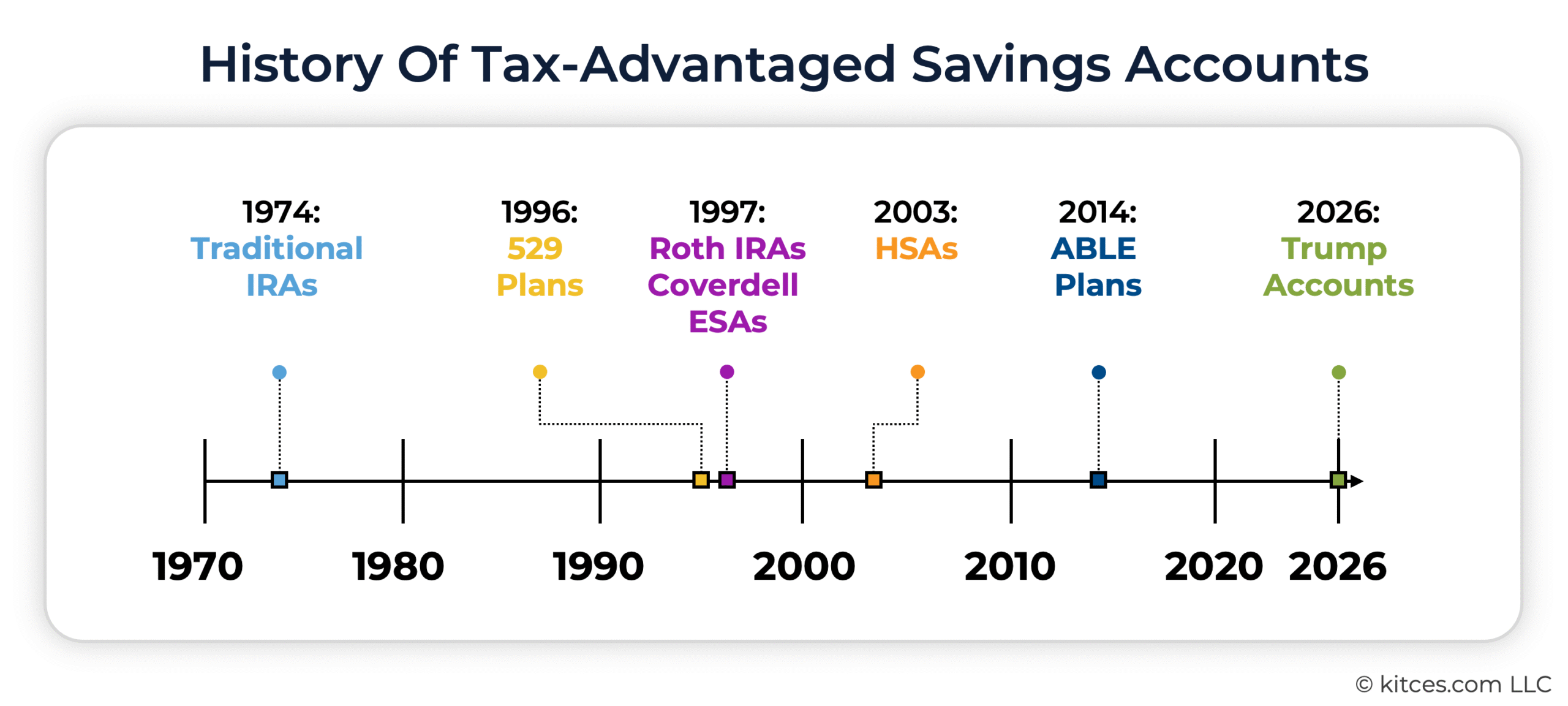
It isn't very often that we get new types of individual retirement accounts. Traditional IRAs have existed for over 50 years, having been created by the Employee Retirement Income Security Act (ERISA) of 1974, while Roth IRAs were added in 1997. Other types of tax-advantaged accounts have emerged more recently: State-run 529 plans for higher education savings were first authorized by Congress in 1996 (although the provision that really jumpstarted the use of 529 plans by making withdrawals for qualified higher education expenses tax-free, rather than just tax-deferred, wasn't enacted until 2001). Coverdell Educational Savings Accounts (ESAs) were introduced in 1997, but have been largely superseded by 529 plans given the latter's tax-free distribution treatment. In 2003, Health Savings Accounts (HSAs) were created under the Medicare Prescription Drug, Improvement, and Modernization Act. And in 2014, 529A "ABLE" plans for qualified disability expenses were authorized under the Achieving a Better Life Experience (ABLE) Act. But by the time of the creation of TAs under OBBBA, it had been more than a decade since we'd seen a major new type of individual tax-advantaged account, and nearly 30 years since there had been one created specifically for retirement savings.
The introduction of TAs is especially notable given that these are not 'standard' retirement accounts for grown-ups to save for themselves, but are instead intended for those grown-ups to save for their kids' retirements. This new account type comes with its own unique set of rules, restrictions, and planning considerations for advisors and their clients to navigate – along with the actual mechanics of opening and maintaining the account.
The Rules Of 530A Trump Accounts
In a nutshell, a Trump Account (TA) can be thought of as a 'starter' IRA, designed for saving and investing on behalf of a minor child, which will be transferred to the child's control once they reach adulthood.
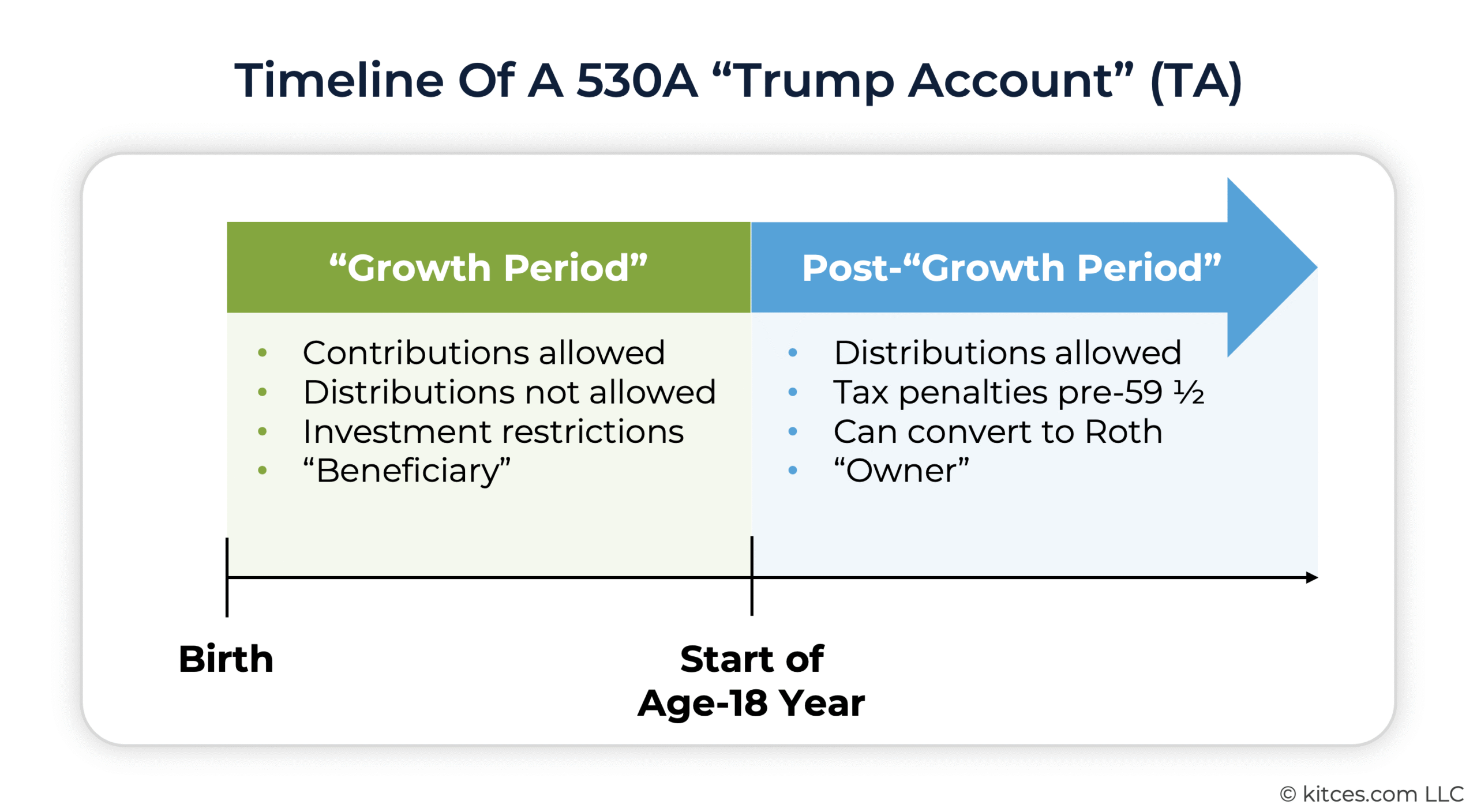
Specifically, a TA can be opened and funded on behalf of a minor individual (known as the "beneficiary") any time between their birth and the beginning of the year in which they turn 18 – a time frame officially deemed the "growth period". During this time, no withdrawals can be made from the TA, and the investment options in the account are restricted to U.S. equity index funds with annual expenses of 0.1% or less. Annual contributions can't exceed $5,000 (although that amount will be adjusted upwards for inflation after 2027), with up to $2,500 of the $5,000 total permitted to come from the employer of either the TA beneficiary or their parent. Additional "qualified general contributions" can be made from government or charitable organizations (e.g., the Dell Foundation's pledged grant of $250 for TAs of children age 10 and under in ZIP codes with a median income under $150,000), and the Federal government is making a $1,000 "pilot" contribution to TAs for children born in the years 2025-2028. While individual TA contributions aren't tax-deductible, employer contributions, qualified general contributions, and the $1,000 Federal contribution are excluded from income.
After the "growth period" is over (i.e., after the beneficiary reaches the year in which they turn 18), the TAs effectively become traditional IRAs, and can be rolled over into another traditional IRA and/or converted to a Roth IRA at that point. The standard IRA rules then apply, including contribution limits, the taxability of distributions (i.e, partially taxable based on the share of after-tax individual contributions to the total account value), and the 10% penalty tax on distributions taken before age 59 ½ without a qualifying exception.
Unlike other traditional IRAs which have an earned income requirement (which is why children generally can't open and fund their own IRAs until they're old enough to work and have income of their own), TAs don't require earned income on the part of the beneficiary . This in turn allows children to get an earlier start on tax-deferred retirement savings with the TA than they would otherwise be able to do, and potentially build up a sizeable pre-tax retirement balance that can then be converted to Roth while they are in a relatively low tax bracket – although as previous research has shown, the difference in after-tax value between saving to a TA versus saving the same amount to a taxable custodial account like a UTMA or UGMA isn't that great, and takes decades to appear, at the cost of significantly less flexibility in the TA compared to the custodial account given the 10% penalty on the taxable portion of withdrawals before age 59 ½. To that end, saving to TAs may not always make sense compared to the other options available (including not just taxable custodial accounts but also 529 plans, irrevocable trusts, or parent-owned taxable accounts).
That being said, there are some reasons why a parent might want to open a TA on behalf of their child. For many, it will be the "free money" aspect: A child might be eligible for the $1,000 Federal pilot contribution, or the parent might be able to receive employer contributions through their job, and so opening a TA might be worth it just to receive those funds that wouldn't be available otherwise. Otherwise, higher net-worth families might find the TA's tax-deferred treatment attractive if they've already fully funded their child's education through 529 plans and adding more savings to taxable UTMA/UGMA custodial accounts could cause them to run into issues with the Kiddie Tax (which taxes unearned income over $2,700 at the parent's marginal tax rate rather than the child's). Or, a parent may simply want to prioritize saving for their children's retirement over other, nearer-term savings goals – given that saving even a little bit at an early age will have an outsized impact after decades of compounding – for which the TA is arguably the optimal choice for achieving the highest retirement balance decades down the line.
Regardless of the reason(s) for wanting to use the accounts, financial advisors who work with parents of minor children will likely receive questions from those clients about opening, funding, and managing TAs (if they haven't gotten them already, since the accounts have been available to open and fund since July 4, 2026). So it's useful to have some knowledge of what the process looks like from the client's perspective. Notably, as will be discussed more below, advisors likely won't be able to open and manage TAs on their clients' behalf as they would an IRA or other investment account: The process as it exists right now is solely 'direct-to-consumer', with no option to delegate it to an advisor or another intermediary. And so walking clients through the process of opening and funding TAs can be a worthwhile use of an advisor's time, since clients who by definition will be encountering TAs for the first time will look to their advisor for clarity and to ensure they do it right (and they won't be able to do it any other way even if they want to!).
Personally, I have two children, ages 6 and 2, who are eligible to have TAs opened on their behalf. Although neither child is eligible for the $1,000 pilot contribution and I don't currently plan on making significant individual TA contributions – our family has focused more on 529 plan contributions for higher education and supplemented with custodial accounts that have more flexibility than TAs – having two TA-eligible children seemed like a good opportunity to see the process firsthand. After opening and making nominal contributions to TAs on behalf of both children (because fair is fair), I can now share some of what the mechanics of TAs really look like – and which parts of the process might be most likely to trip up parents opening accounts for their own kids.
What's Unique About Opening Trump Accounts
Most financial advisors are familiar with the process of opening an IRA: The investor (or their advisor) fills out an application or account opening form at their broker-dealer or custodian of choice, the application is signed and submitted, and shortly afterwards the account is open and can be funded via contribution or rollover and invested as the investor and/or their advisor see fit. Investors can own as many different IRAs as they want to, across multiple institutions, and keep funds in any or all of them.
The process of opening a Trump Account (TA), however, is very different from opening a standard IRA. Rather than starting with choosing a financial institution and then filling out an account application, opening a TA first requires filing an IRS form, Form 4547. Then, after Form 4547 has been accepted by the IRS, the account can be opened – but only through a specific website operated by Robinhood, which was designated (in partnership with BNY) by the Treasury Department as the sole initial administrator and trustee for TAs. (Individuals will eventually be able to open TAs at other institutions, but only for 'rollover' purposes – the initial accounts must always be opened through Robinhood.) After filing Form 4547 and opening the account, the account can be funded and invested, although as of this writing the only investment option is an S&P 500 index ETF. Only one TA is allowed per eligible child – funds can be transferred from one to another, but the entire account must be transferred and the old account closed.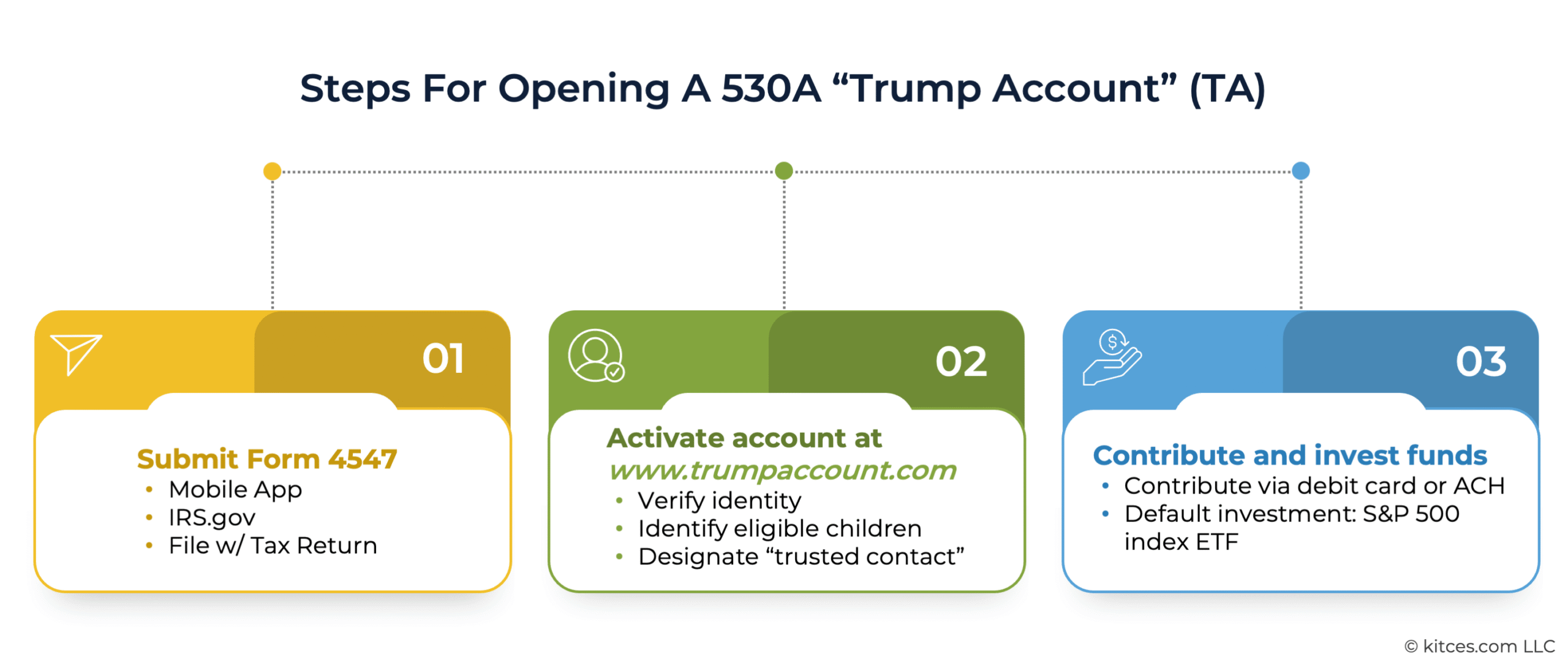
Given the uniqueness of the mechanics of opening and maintaining a TA, it's worth going into detail on each of these three steps – filing Form 4547, opening the account, and funding contributions – to get a clear understanding of what the process looks like through the client's eyes.
Filing Form 4547
The first step of opening a TA is to file Form 4547, which can be done in one of three ways:
- Filling out the form and filing it along with the account opener's individual tax return;
- Filling it out within the official Trump Accounts app on iPhone or Android phones; or
- Filling it out on the IRS website via the account opener's individual online account.
The Trump Accounts website (https://trumpaccounts.gov/) pushes users towards downloading the app and filing Form 4547 that way. However, I picked a different option – filling out Form 4547 on the IRS website – in part because I'd rather not download the official app onto my phone, and in part because I already have an IRS account through which I can access the online form. The process of filling out the online Form 4547 for both children was relatively quick: I had to provide my own name, address, Social Security number, and email address, along with the name, date of birth, Social Security number, and relationship to me for each child. Then I clicked the button to submit the form and I was all done.
It's worth noting, however, that for people who don't already have an IRS online account that allows them to fill out Form 4547 online, it can be rather onerous to create one. The process involves setting up an online 'wallet' through ID.me (the IRS's user account vendor) and taking a picture of a photo ID and a 'selfie' to verify identity. For those who already have an online account – e.g., for making quarterly estimated tax payments, working through audits, or accessing prior year tax records – the online form makes sense. But for those who don't, it might not be worth going through the hassle of setting up an account just to fill out Form 4547, and it could be simpler just to go through the app or file Form 4547 along with a tax return.

Nerd Note:
Notably, although Form 4547 can be submitted along with a tax return, it doesn't need to be submitted by the April 15 tax filing deadline: TAs can be opened at any time throughout the year. The option to submit the form along with one's tax return exists purely for convenience (e.g., for families who would prefer to have their tax preparer or tax preparation software handle the filing instead of doing it themselves) rather than any obligation to do so.
While other types of accounts for minors, including custodial UTMA/UGMA accounts and 529 plans, can be opened on a child's behalf by almost any adult including parents, grandparents, other relatives, or friends, TAs have strict rules governing who can open an account on a particular child's behalf. As laid out in the IRS's proposed regulations on TA opening, a "responsible party" who opens a TA on a child's behalf can only be a legal guardian, parent, adult sibling, or grandparent of the child, in that order. In other words, if there is no designated legal guardian, then a parent may open the account; if there is no legal guardian or parent, then an adult sibling can open the account; and if none of those are available, then a grandparent may open the account. However, if the child was born from 2025-2028 and is eligible to receive the $1,000 Federal pilot contribution, then in order to receive the contribution the adult opening the account must be the person who claims (or expects to claim) the child as a "qualifying child" on their tax return. 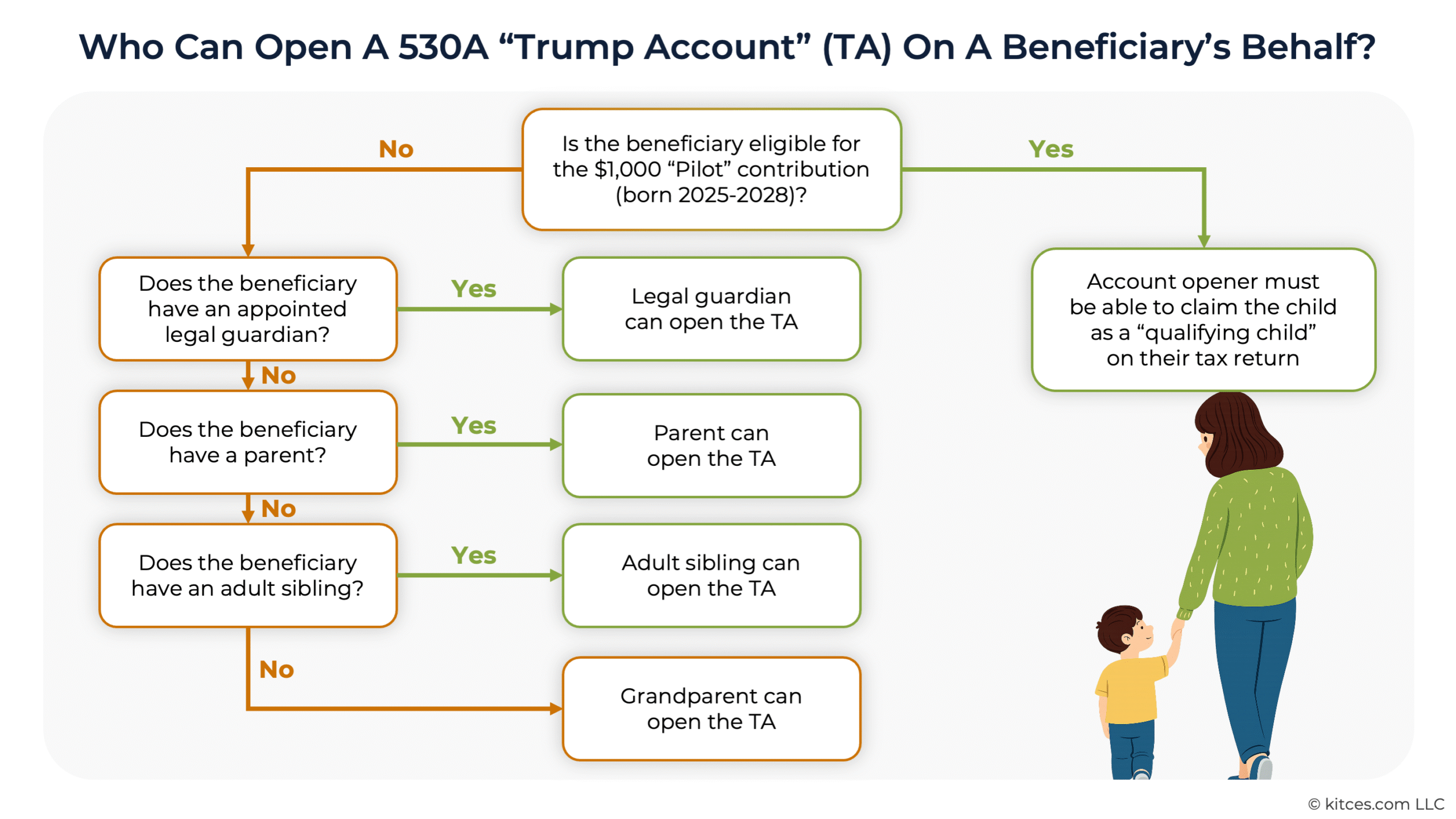
In most cases, therefore, the person opening the TA on a child's behalf will be their parent or other legal guardian. While grandparents and other relatives may contribute to that account, they won't be able to establish their own TAs on the child's behalf.
"Activating" The Account
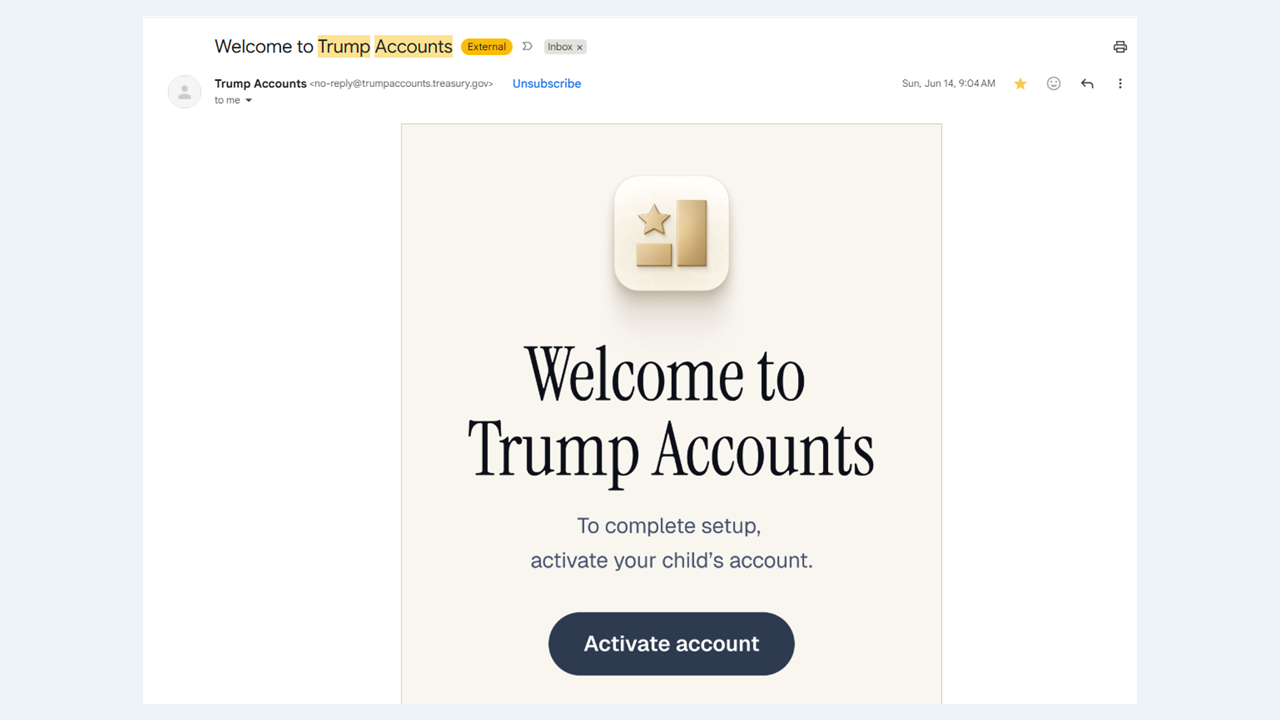
It took about three days after submitting Form 4547 online until I got an email inviting me to "activate" the TAs for both children. It seems likely that scammers will try to spoof these emails in the future to trick people into clicking on links to malicious software, so it's important to ensure that the email comes from a real government email address ending in ".gov" – mine came from "[email protected]", had a "Welcome to Trump Accounts" subject line, and looked like the following:
Clicking the link took me to trumpaccount.com, which is the site TA owners will use to access the accounts themselves. Although Robinhood is serving as the financial agent and trustee of the accounts, trumpaccount.com is a separate site with no Robinhood branding. It would be difficult to even know that Robinhood was involved if their name wasn't on the account agreement I received while opening the account.
Unfortunately, trumpaccount.com is confusingly similar to trumpaccounts.gov, the website created by the Federal government to promote the accounts, both in terms of the URLs used as well as the visual style of the sites. Here's trumpaccounts.gov, which doesn't provide access to the TAs themselves, just encourages people to download the app and apply for the accounts:
And here's trumpaccount.com, which is where the accounts themselves can be accessed:
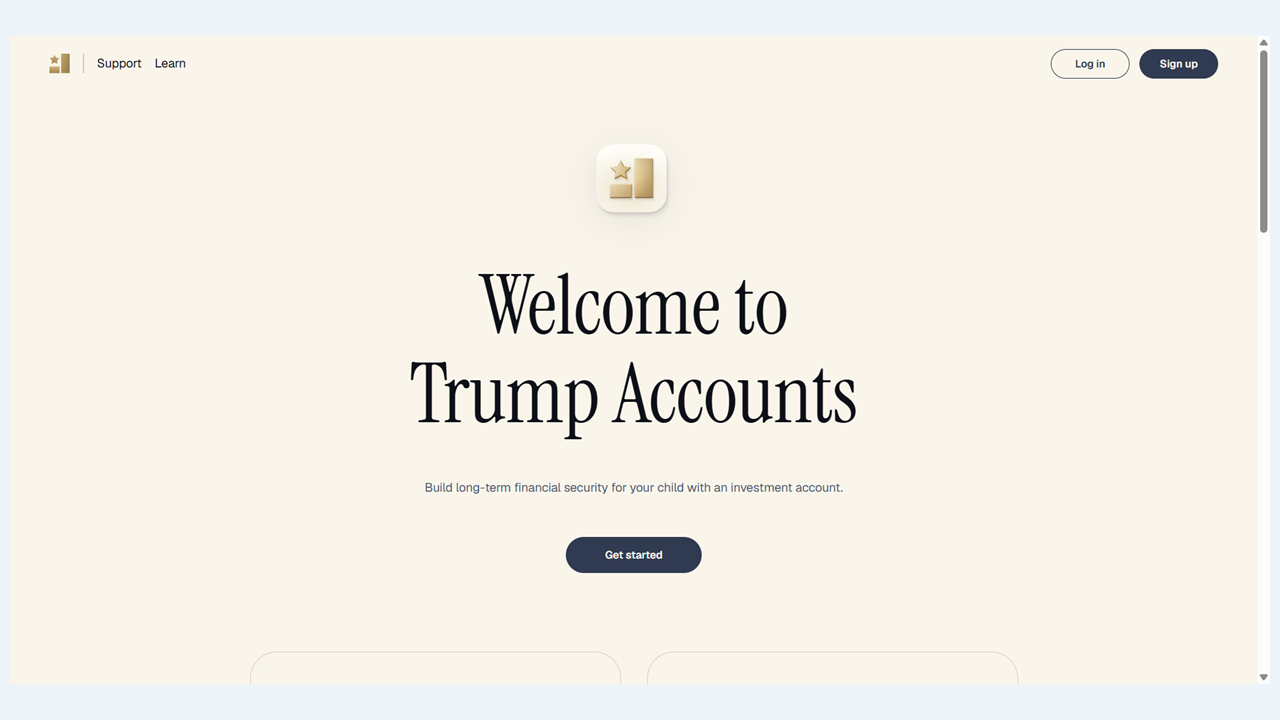
The most obvious difference, other than the "log in"/"sign up" buttons in the corner of trumpaccount.com, is the nickels and dimes scattered throughout the page on trumpaccounts.gov. So I guess the rule of thumb is that if you see change on the site you're on, you need to change the site you're on (if you want to access your child's TA)?
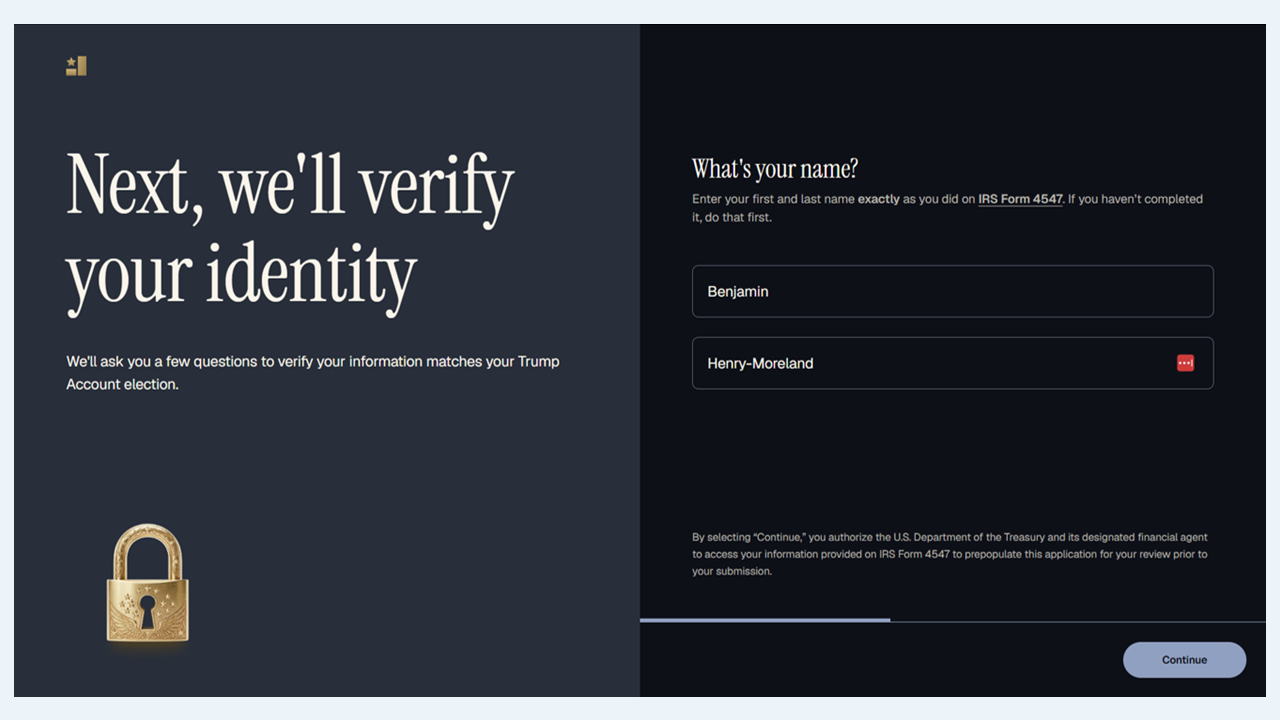
Anyway, after clicking the link to trumpaccount.com, creating a password, and providing a cellphone number for two-factor authentication, I was asked to verify my identity by entering my name as it was shown on Form 4547 (hyphenated names like mine can be frustrating on some website forms that aren't equipped to handle them, but thankfully it wasn't an issue here):
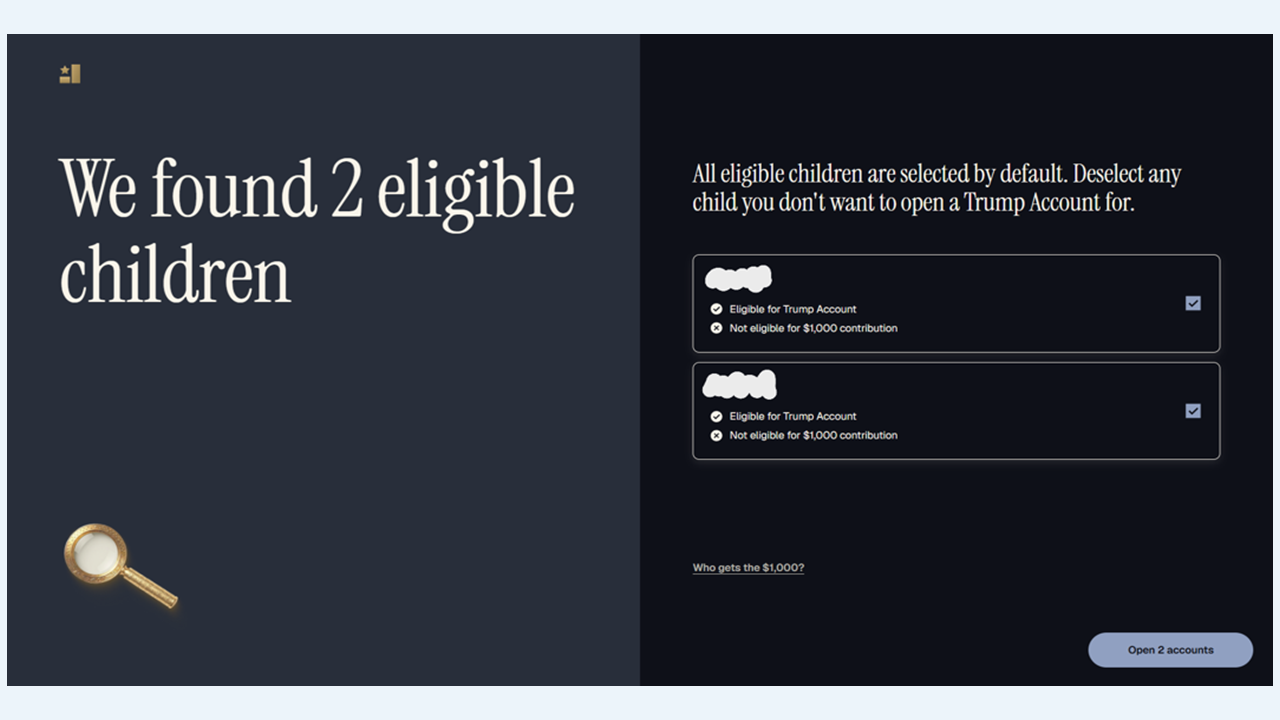
The site then automatically pulled the information for the two children I had listed on Form 4547, and prompted me to open accounts for both at the same time:
The website was a little glitchy when I was going through the account opening process, requiring me to click the "continue" button several times before advancing to the next screen, but once I made it through those steps everything seemed to work properly. Now the accounts were officially open.
Designating A Trusted Contact
The trumpaccounts.com website gives users the ability to designate a "trusted contact" whom Robinhood is authorized to contact and give information about the account if they cannot contact the TA's "responsible party" (i.e., the parent or guardian who opens the account) or if they suspect fraudulent activity in the account. Notably, this isn't the same as designating someone else to serve as the responsible party if the original responsible party dies or is incapacitated: Because only certain individuals can fill the role of responsible party as described earlier, the original party can't choose who is 'next in line' after them. And the trusted contact is only authorized to be contacted and given information about the account, not to access or manage the account. Still, it's worthwhile to designate a trusted contact, and I did so to make sure there's someone who can be brought 'in the loop' on the TA if I'm not available for any reason.
One thing that isn't anywhere on trumpaccount.com is the option to designate a beneficiary for the TA. For a standard IRA, one of the most important steps is to designate a beneficiary who will receive the account upon the death of the original account owner – with a maze of rules surrounding required distributions from inherited IRAs in the wake of the SECURE Act, the question of who receives those accounts is critical from a planning perspective. Those rules don't apply to TAs during the growth period, however: In the tragic event that a TA beneficiary passes away before the year in which they turn 18, the account ceases to be a TA, loses its tax-deferred status, and the full market value of the account (minus the amount of any after-tax individual contributions made) is taxed as ordinary income in the year of the beneficiary's death. (Once the growth period ends, however, the rules for the death of the account owner revert to those of standard traditional IRAs.)
The trumpaccounts.com website doesn't currently give users the ability to designate a successor beneficiary to receive a TA's funds upon the death of the original beneficiary. So it appears that, if the original beneficiary passes away, then (1) the funds would be considered received by the beneficiary's estate and would be included as taxable income on the beneficiary's final tax return; and (2) assuming the beneficiary doesn't have a will, the funds themselves would be distributed according to state intestacy laws, which generally dictate that a minor's assets are passed on to their parents or legal guardians.
Contributing To Trump Accounts
While I created my children's TAs in June, it wasn't possible to make contributions to the accounts until July 4, 2026, and sure enough on that day I got another email inviting me to make my first contribution(s). After logging into trumpaccount.com, the site gave me two options for contributing: by using a debit card, or by linking a checking or savings account to contribute via ACH transfer. While the debit card contribution could be done instantly versus 4-5 days for the ACH transfer, I chose to do the ACH transfer rather than enter a card number. The TA site uses Plaid to link bank accounts, and since I already have Plaid-connected accounts through my Monarch financial dashboard, all I needed to do was enter my phone number and pick the account from which I wanted to contribute from the list of linked accounts. Individuals who don't already have accounts linked through Plaid can connect their account manually by selecting their bank from a list and logging into their bank account to authorize the connection. After connecting an account, I chose an amount to contribute and a frequency (I chose a one-time contribution, but it's also possible to set up automatic weekly, twice-monthly, monthly, or quarterly contributions). The site also helpfully displays how much more can be contributed before reaching the $5,000 individual contribution limit. There's also a shareable QR code that can be sent to grandparents or other individuals who may want to make a contribution directly – a useful feature to minimize the hassle of depositing gifts from third-party individuals.

Nerd Note:
There were questions prior to the launch of Trump Accounts as to whether an individual contribution to a child's TA would qualify for the annual gift tax exemption of $19,000 per person per year, or whether it would require the giver to file a gift tax return (Form 709) and deduct the gift's value from their lifetime gift and estate tax exemption (currently $15 million per person). This was because in order to qualify for the annual exemption, a gift must be a completed "present interest" gift, i.e., one where the recipient has immediate access to the entire gifted amount – whereas funds within a TA cannot be accessed at all until the beneficiary reaches the year of their 18th birthday.
However, in the days leading up to the July 4 launch date, the IRS released Revenue Procedure 2026-25, which established a safe harbor that qualifies most TA contributions for the annual gift exclusion, provided that the contributor's total gifts (including TA contributions) to the beneficiary don't exceed the $19,000 annual exclusion amount, and that the contributor isn't otherwise required to file a gift tax return. In other words, family members and other individuals who contribute to a child's TA won't need to file a gift tax return or reduce their lifetime exclusion as long as they aren't making other large gifts that would already require them to file a gift tax return.
Notably, there's a high potential for accidental overcontributions to TAs given the multilayered contribution limits: Since employers can contribute up to $2,500 per employee to Trump Accounts on their or their kids' behalf, but that amount counts against the $5,000 total contribution limit, then individuals who receive a combination of employer and individual contributions might find it easy to lose track of how much has actually been contributed and inadvertently add more than the $5,000 maximum.
Robinhood addresses this in their customer agreement by stipulating that:
"If contributions exceed the annual limit… the excess funds will be automatically moved to a separate account... This Supplemental Account is a standard custodial account (like a UTMA/UGMA)… Withdrawals from the Supplemental Account must be for the exclusive benefit of the Account Beneficiary and are otherwise generally not restricted. Any income or gains earned in the Supplemental Account are subject to standard taxation."
In other words, any excess contributions will result in Robinhood opening an "overflow" taxable custodial account that the excess amounts will be distributed into – for which the standard taxable account rules (including the "kiddie tax" rules for unearned income), rather than the TA rules, will apply.
A final consideration for contributions is that, as outlined in IRS Notice 2025-68, Q&A C-4, TA contributions made during a given calendar year can only be applied towards that year. This is in contrast to standard IRAs, where a contribution for a given year can be made up until the April 15 tax filing deadline of the following year. For example, a TA contribution made on January 31, 2027 can only be counted as a 2027 contribution, and wouldn't have the option to be counted for 2026 as would be the case with a standard IRA.
Investing In Trump Accounts
After the expected 4-5 day ACH transfer time my contributions landed in both kids' accounts, where they were automatically invested in the fund that the Treasury Department has selected as the default investment for TA contributions: The State Street SPDR Portfolio S&P 500 ETF (SPYM), an S&P 500-tracking index fund with an expense ratio of 0.02%. As of this writing I'm not able to select any other investment for the accounts; however, according to Treasury's announcement there will eventually be an approved menu of similar low-cost U.S. equity ETFs to choose from, which initially includes:
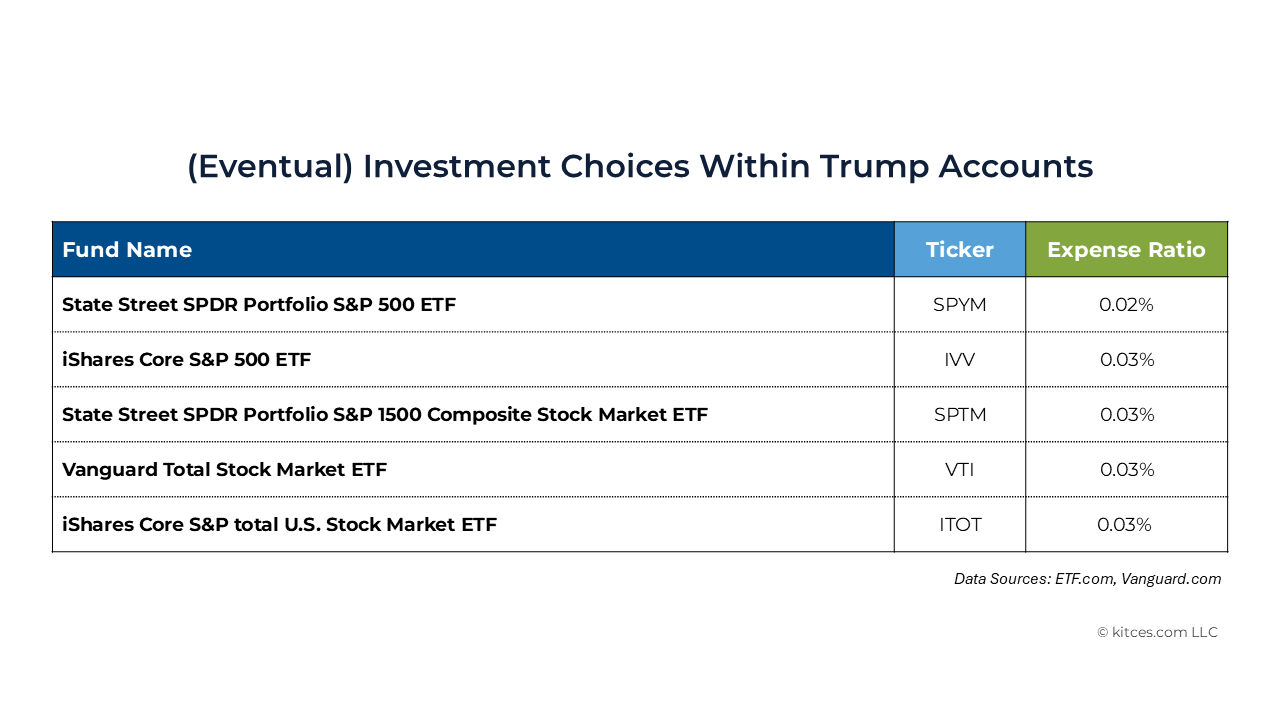
Unlike many types of savings accounts that have pre-set fund "lineups" (like 401(k) and 529 plans), this one doesn't appear to be geared towards providing an assortment of different asset types that can be arranged into a customized asset allocation mix. Instead there are two funds tracking the S&P 500 index, one tracking the S&P 1500 (SPTM) which covers about 90% of U.S. market capitalization, and two that aim to track the total U.S. stock market (VTI and ITOT). There's little reason to choose more than one fund in this lineup; instead, it roughly comes down to whether I want the allocation to cover only U.S. large cap equities (i.e., either of the S&P 500 tracking funds), or a combination of large, medium, and small cap (i.e., either the S&P 1500 or either of the "total stock market" funds).
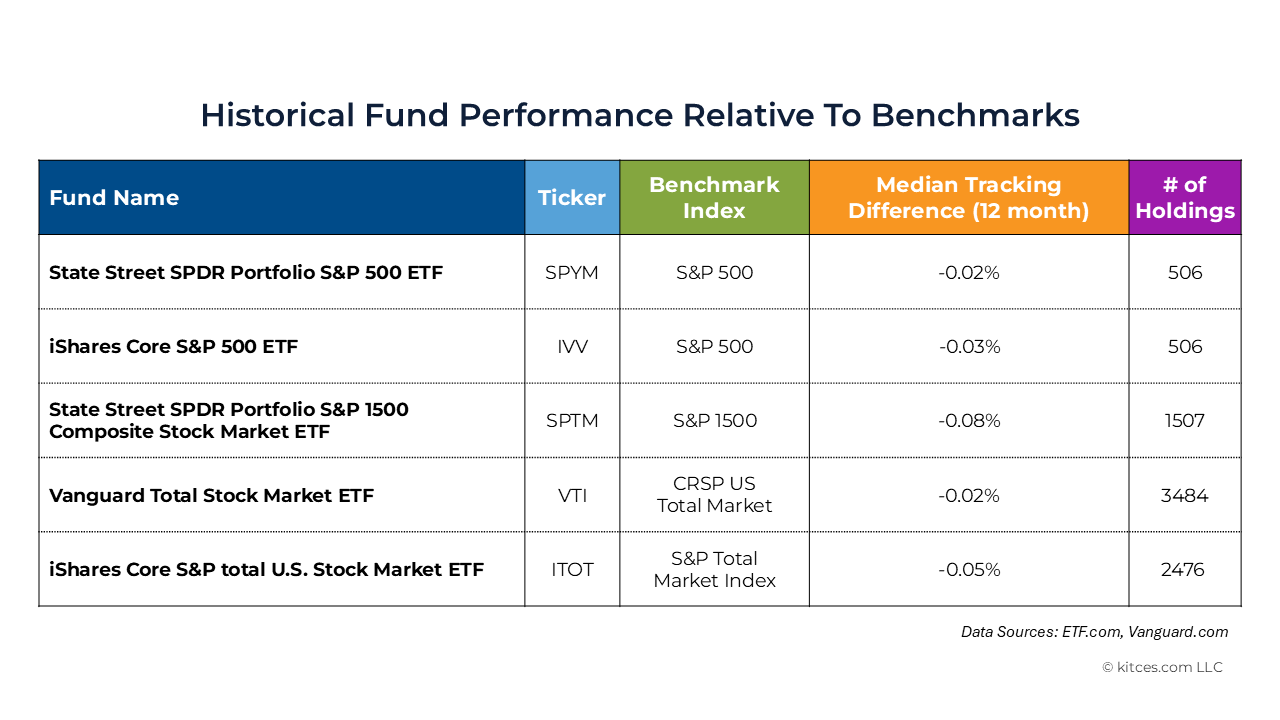
When I'm able to reinvest the funds I will likely move them into VTI in order to obtain slightly more diversification than the S&P 500 and capture some of the small cap premium, but given that the stocks in the S&P 500 are predominantly weighted in even the total stock market funds, I don't expect a large difference in performance between the S&P 500 funds and the broader market funds. Other investors might prefer to stick with the S&P 500 fund in order to get higher exposure to familiar names like Nvidia, Apple, Alphabet (a.k.a. Google), and Tesla, while others, like me, prefer to own essentially the entire stock market. In terms of actual performance, though, the long-term difference between the two has historically been – and can be expected to remain – fairly marginal.
Managing And Rolling Over Trump Accounts: What Comes Next?
Now that both of my kids' Trump Accounts (TAs) are opened, funded, and invested, all that's left to do is to sit back and let compounding work its magic, right? Well, there are a few other factors to consider in the months and years ahead as I (and my kids) wait for these accounts to 'mature'.
Tracking Basis
Because my individual TA contributions were non-deductible, they create "basis" in the TAs, with the basis portion of any subsequent distributions being tax-free and the remainder being taxable. E.g., if I contributed $100 to the TA, and it eventually grows to $400 in value before my child eventually distributes it, then ($100 ÷ $400) = 25% of any distributions will be tax-free, while the remaining 75% will be taxable.
But that means that someone needs to actually keep track of the basis in the account over the years in order to accurate calculate the taxable and tax-free portions of any distributions. How will that work?
For each year that my children are in their respective growth periods, the custodian of their TAs will issue Form 5498-TA, which will show the amounts and types of any contributions made during the year, the fair market value of the account at the end of the year, and most notably, the basis in the account as of the end of the year. This is in contrast to standard IRAs, where the onus of tracking basis falls on the account owner (via filing Form 8606) rather than the custodian or broker-dealer holding the account.
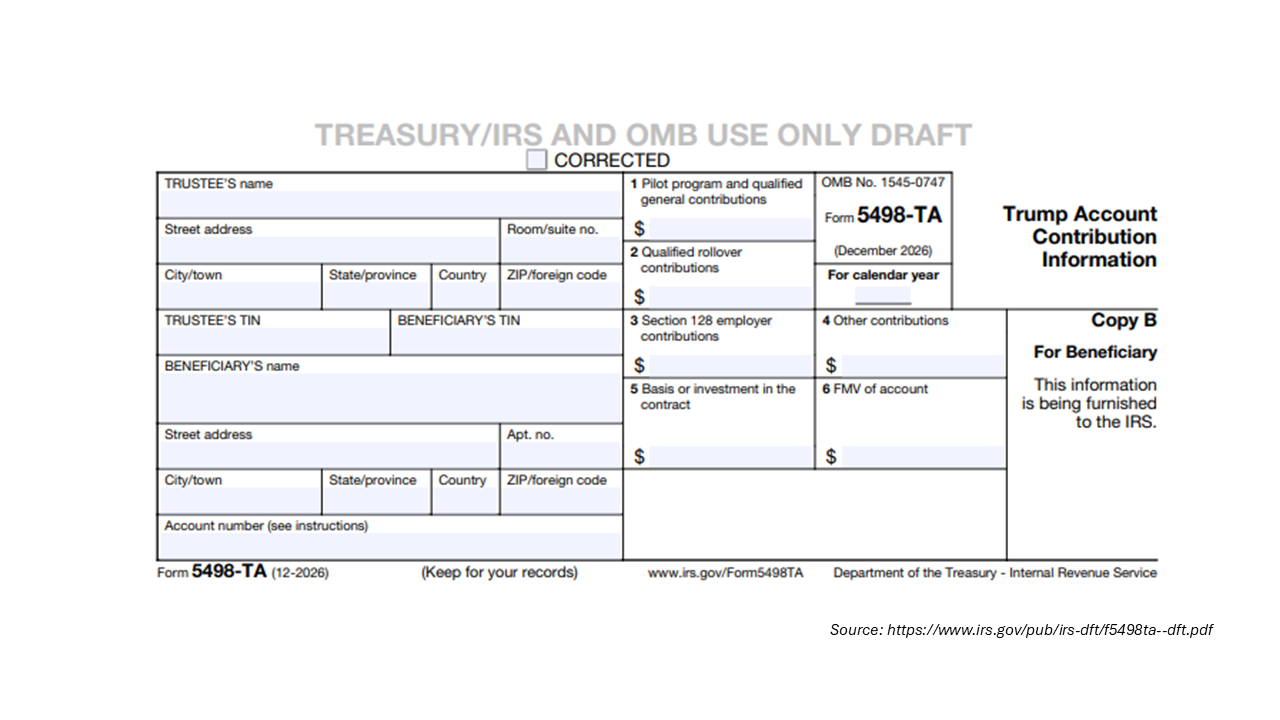
Once my children reach the years of their 18th birthdays, however, the custodian will no longer continue to track their account basis. So for their birthday in those years, along with full access to whatever has accumulated in their TAs, both children will be getting a lesson in filing Form 8606 to make sure they accurately track of their basis (and receive the tax-free portion of their funds that they're owed) for as long as they keep their accounts!
Transferring Accounts
As of this writing, Robinhood (via the trumpaccount.com website) is the only place where it's possible to open and maintain a TA. For all new TAs going forward, this will continue to be the case: As the "financial agent" designated by the Treasury Department, Robinhood will be the exclusive manager and custodian of all new TAs. However, other financial institutions will also be allowed to provide "rollover" TA accounts which, once an individual opens their initial TA at Robinhood, would allow them to subsequently transfer the account to a different institution of their choosing. (No child can have more than one TA on their behalf at any given time, so transfers must be of the entire account, not just a partial amount.)
Currently a handful of custodians have announced their intent to offer TAs for rollover purposes, though none are actively taking rollovers yet. Both Fidelity and Vanguard state on their website that rollovers will be available to their platforms pending further guidance from the Treasury department, and Schwab in an emailed statement said that "We look forward to supporting Trump Accounts on the Schwab platform once the rollover period starts". The likely takeaway is that while most major custodians will eventually offer their own varieties of "rollover" TAs, they probably won't be available until 2027 at the earliest as they wait to receive and incorporate IRS guidance.
What Happens At Age 18?
It feels like the distant future now, but eventually my current 6- and 2-year-olds will reach the years in which they turn 18 and come to the end of their growth periods (at least for TA purposes – hopefully their personal growth remains a lifelong activity!). Robinhood's Trump Account customer agreement – which I received when I opened the accounts – gives some indication of what will happen at that point.
First, Robinhood specifies a "restricted period" lasting from the first day of the year in which the child turns 18 until the day of their actual 18th birthday, during which no contributions, distributions, or rollovers from the account will be allowed and the growth period's investment restrictions will remain in place. In other words, the account effectively remains in limbo for several months (more or less, depending on when on the calendar the child's birthday falls) after the end of the actual growth period. Presumably this is to avoid having an awkward gap between the end of the growth period and the time when the beneficiary can legally take ownership of the account (which is at age 18 under most states' laws). But it ultimately means that, while the beginning of the year of the child's 18th birthday may be the end of the growth period (and the associated special Trump Account rules) under Federal law, they don't really get to control the account – whether that's to distribute, roll over, or Roth-convert their TA – until the actual date of their 18th birthday.
The other notable takeaway from Robinhood's customer agreement is that, once the beneficiary reaches the end of the "restricted period" above (i.e., their 18th birthday), their account will be automatically rolled over to a traditional IRA (presumably on the Robinhood retail investing platform, presuming it hasn't been transferred elsewhere). This has little impact from a tax perspective as the rules for post-growth-period TAs and traditional IRAs are virtually identical, but it's just one more thing to prepare for – a different account login, a different set of statements, and a 1099-R to watch out for in the year of the rollover – as each child approaches their age-18 year. And as noted earlier, it will be critical for them to each designate a beneficiary once their TAs convert to a standard IRA, since all of the standard IRA beneficiary rules will start to apply at that point!
It's early enough in the lifespan of TAs that much of the above could change in the coming years, months, or even weeks and days. There are even questions about whether TAs will last if political climates shift and the Democratic party takes control of Congress and/or the White House, given how sharply the opinions on their namesake differ between parties. However, the current administration has put a lot of effort into promoting the account, which has in turn created enough momentum – with a reported 6+ million TAs signups occurring even before the window for contributions began and a growing list of large companies pledging to make employer contributions – that it would be unrealistic at this point to shut the program down entirely. Though a future Congress may tweaks the rules, there's only so much change that's feasible when there are already millions of accounts open with real dollars in them.
Overall, each step in the process of opening, funding, and investing in TAs is relatively painless. But the entire process as a whole – starting with filling out a form on one website, then opening an account an a different website, then deciding between a handful of nearly identical funds to invest in, then (potentially) transferring the account to a different custodian, all while remembering when it is or isn't necessary to track basis – is far from intuitive. Ultimately, advisors who can walk through each of these TA-opening steps will help their clients avoid confusion, set up the accounts properly, and get started on saving for the next generation!