
Executive Summary
Financial advisors who work with a particular client niche often face recurring planning questions that, in turn, require the same calculations or analyses for different clients each time they arise. It's often helpful to have software that can perform these analyses faster, more repeatably, and in the way the advisor wants; however, the economic reality of the technology industry is that it's only really viable to build, market, and sell a piece of software if it provides a solution that a lot of people are willing to pay for. Which means if the advisor is only one of a few people – or the only person – who needs that particular kind of software, they aren't likely to find that solution on the market unless they build it themselves.
Traditionally, many advisors have built custom spreadsheets to handle these types of analysis for which an out-of-the-box solution doesn't exist, but those spreadsheets are often cumbersome and time-consuming to build, maintain, and debug. And while custom-built web apps can perhaps do the job more reliably, they've historically required the advisor to either be an expert in programming languages such as Python or JavaScript, or to hire a developer to build it for them.
More recently, however, it's become possible to build custom software programs without coding expertise using certain types of AI tools – a process popularly known as "vibe coding". At a high level, using vibe coding tools like Replit, users can essentially tell an AI bot what type of tool they want to build. The AI then handles all the code and back-end infrastructure needed to develop a working product. The user can then test the program and iterate with the AI bot to resolve any issues until the final version is ready.
One advantage of vibe coding is that you can start small to build familiarity. Advisors can experiment with simple tools and calculators – which can often be created using the free tiers of vibe coding tools like Replit – while they get comfortable with the process of iterating back and forth with the AI bot to improve the software. Once they've reached a baseline level of comfort, they can upgrade to paid tiers that allow for more complex or comprehensive tools, while potentially adding steps like 'wireframing' (i.e., creating a basic visual guide to the software before building the full-blown version) to help plan out particularly advanced software in advance to avoid problems that would need to be worked out after the fact.
The key point is that although there is a learning curve to vibe coding, it's not nearly as steep or time-intensive as learning traditional programming languages. What matters most for advisors who vibe code is their own financial planning expertise and their ability to communicate, since those are the main skills needed to 'converse' with an AI bot that can handle the technical development capabilities. Ultimately, then, vibe coding has the potential to provide a lot of value for expert advisors in highly niche fields – since they already have the expertise to develop the tools they need, and will no longer be reliant on off-the-shelf software solutions to build the exact tools to help them serve their clients' needs!

The term "vibe coding" has become popular recently, as a somewhat tongue-in-cheek phrase that describes the process of building software applications using natural language prompts with AI tools rather than traditional programming languages. The term captures the idea that you can now create functional code by simply describing what you want your program to do in plain English (or explaining the general 'vibe' you're going for), rather than needing to master the intricacies of programming languages like Python or JavaScript.
Vibe coding becomes particularly compelling for the niche problems that advisors encounter repeatedly in their specific practice, but which are too specialized to ever warrant attention from major financial planning software companies.
To ground this in reality, let's immediately jump into a potential use case. Consider an advisor who works primarily with early-career physicians. While juggling a later start to their career, jump-starting retirement savings, and paying off student loans, it is not uncommon for these clients to purchase homes with less than 20% down, which means they're paying private mortgage insurance (PMI). The question of whether to make principal prepayments to eliminate PMI faster may come up regularly for an advisor, but it's a calculation that most tools handle poorly.
Using vibe coding, this advisor can describe the exact problem to an AI tool and, fairly quickly, have a working web-based calculator that walks clients through the inputs and visualizes how ROI changes across different time horizons – no programming experience required.
In fact, here's an example of some results from a PMI prepayment ROI app we'll build in this post as an illustration:
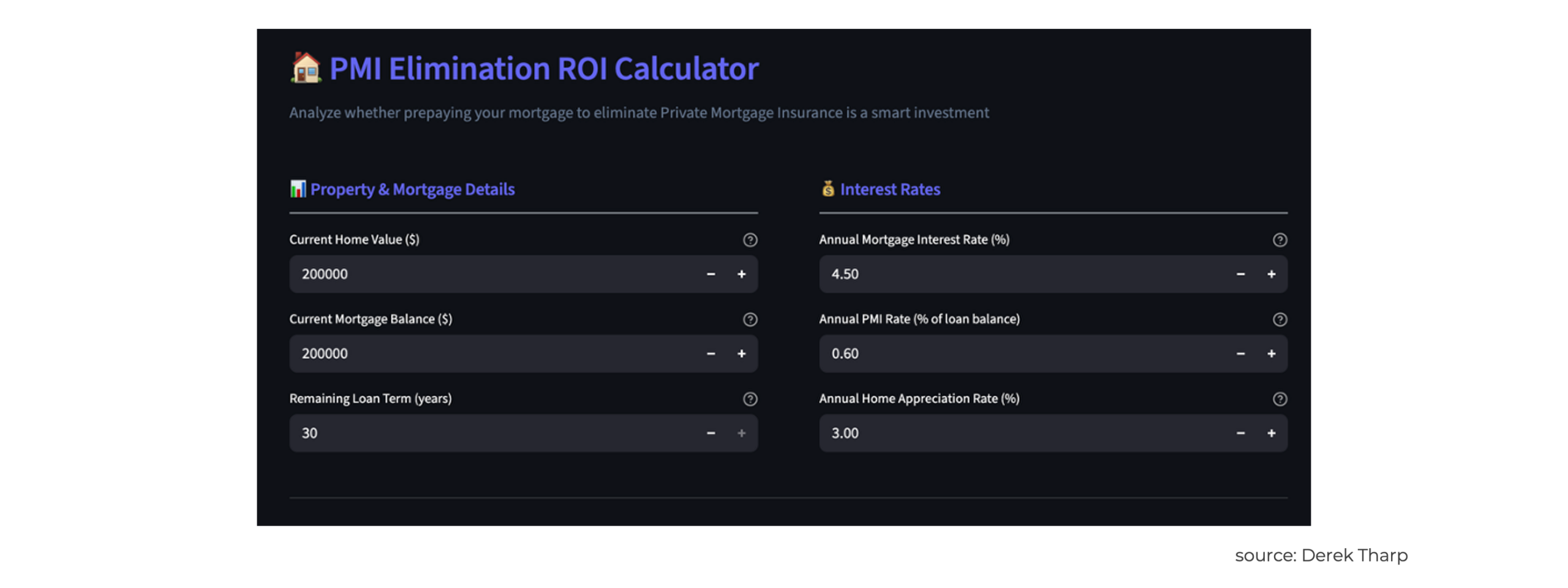
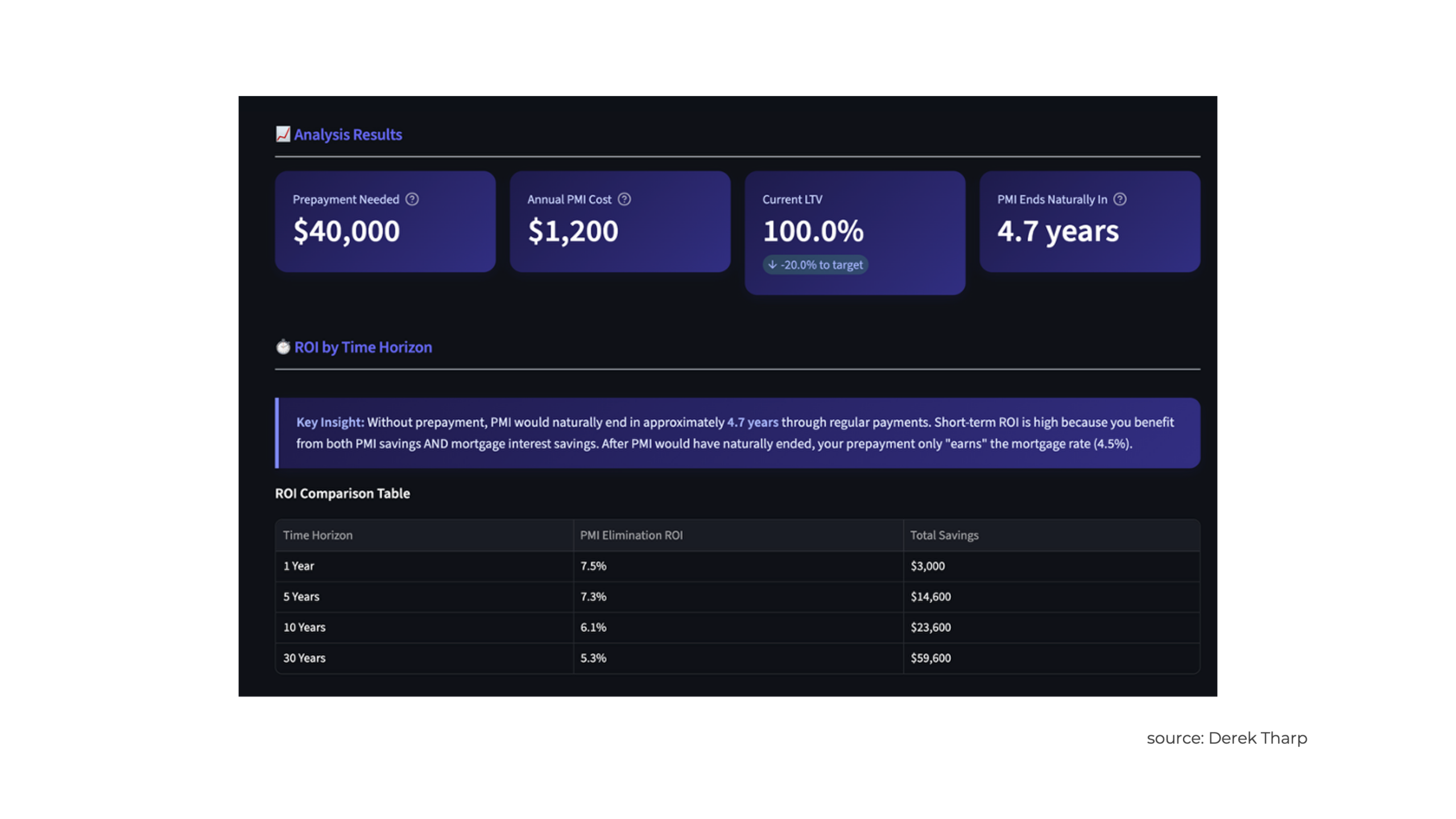
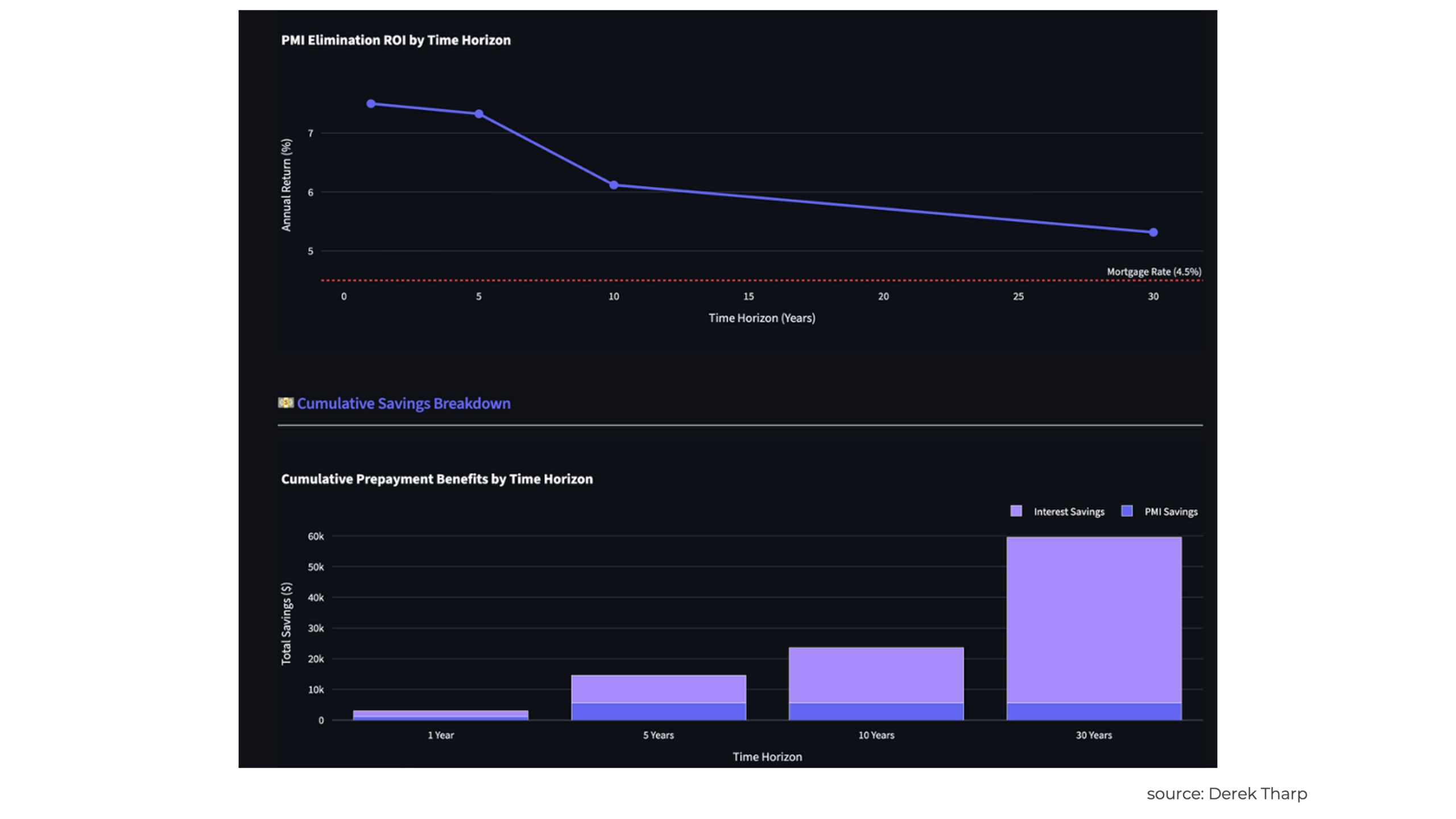
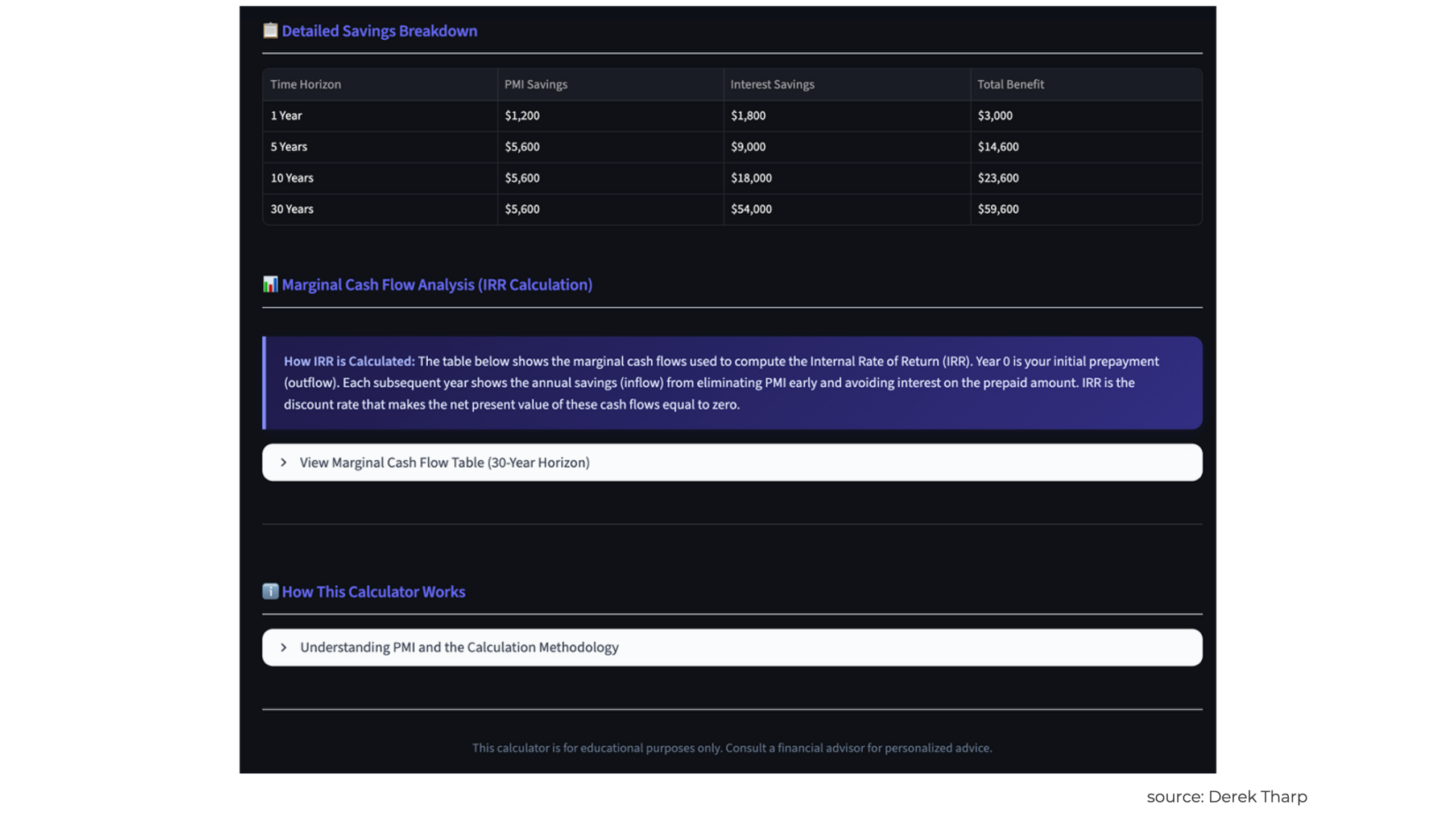
We'll dive into the details of this vibe-coded app later in the post, but as you can see in the screen above, I can quickly surface a lot of useful information that could be helpful if this is a scenario I run into often. Moreover, I built this without doing any coding myself, and I did so in significantly less time than it would take to build a custom spreadsheet to perform the same analysis.
This example illustrates what is powerful about vibe coding: it dramatically broadens who is capable of making simple apps and other tools. Instead of learning complex syntax and spending years developing programming expertise, people can now articulate their software needs conversationally and receive code that aims to accomplish that goal. While the results aren't always perfect and often require some iteration, the barrier to developing customized apps or calculators has dropped dramatically.
Now, it's worth acknowledging upfront that much of the attention surrounding AI tools in the financial advisory industry has focused on more obvious applications: note-taking tools that can quickly summarize a meeting, specialized chatbots that can answer topical questions (e.g., TaxGPT), and the use of Large Language Models (LLMs) to quickly synthesize information from multiple sources. These are certainly valuable applications, and we've already seen these use cases pick up among advisors.
However, focusing solely on these chatbot- and research-oriented applications doesn't fully capture what's possible with AI in the current marketplace (not to mention the future!). The reality is that LLMs and specialized AI development tools have evolved to the point where even financial advisors with limited technical skills can build practical, custom software tools that would previously have required either significant coding skills or expensive contracts with software developers.
Consider the types of specialized calculations and analyses that financial advisors regularly perform for clients – such as the PMI scenario above. How often have advisors found themselves thinking, "I wish there were a simple tool that could help me model this specific scenario for my clients", only to realize that building such a tool would require programming knowledge they may not possess? Or perhaps they've identified a particular workflow inefficiency in their practice and thought, "There should be an app for that", but the cost and complexity of custom software development made the project impractical.
Previously, a highly-niched tool that wasn't applicable to many advisors was commercially infeasible. An advisor with a highly specialized clientele (e.g., owners of multi-office dental practices in the Midwest) may have some routine calculations they frequently repeat for their clients, but the customized and unique needs of their clientele make it difficult for financial planning software companies to invest in developing a specialized tool. So, instead of developing technology, the firm itself bears this cost as a labor expense.
This is where vibe coding becomes particularly intriguing for financial advisors. Rather than being limited to off-the-shelf software that may not perfectly match your practice's needs – or being forced to choose between expensive custom development and cumbersome workarounds – advisors can now create purpose-built tools tailored to their specific client scenarios and practice management challenges.
The implications go beyond just making life easier. When advisors can quickly prototype and build custom tools, they open up new possibilities such as more personalized client experiences, smoother analytical workflows, and proprietary methodologies that set their practices apart. For instance, a tax-focused advisor may build a specialized tool for modeling charitable giving strategies across multiple tax years.
Advisors may also develop customized tools that help them connect with their target market and resonate with niche clientele. Consider again the advisor serving owners of multi-office dental practices in the Midwest. Suppose this advisor has developed some KPIs for business owners that they provide online education and content around. Rather than simply putting education out into the world and hoping people will reach out, advisors could develop a simple KPI calculator tool that would provide a customized report for a user who is willing to share an email address.
To be clear, the takeaway is not that every financial advisor needs to become a software developer, nor should advisors abandon proven tools and processes that already work well. Rather, basic software development through AI development tools unlocks new possibilities for advisors who have potentially wished they could build something custom but lacked the technical skills to do so.
Vibe coding allows advisors to leverage their existing domain expertise – their deep understanding of financial planning concepts, client needs, and practice management challenges – to create tools that directly address those areas of expertise. The technical implementation becomes secondary to the advisor's ability to clearly articulate what they want to accomplish.
Moreover, this shift isn't just limited to people outside of software development. In a recent talk, Sean Grove of OpenAI argued that code is only 10-20% of a true engineer's meaningful impact, with the 80-90% of their most important contribution being "structured communication" (i.e., communicating with users and teammates to build tools, but then also testing and validating to see if tools are actually doing what they set out to do). Grove also argued that vibe coding actually "feels good" because vibe coding is about communication first and the code is just a downstream artifact resulting from that communication – we describe our intentions, and AI models do the grunt work. Grove even suggests that the best programmers of the future may not even be "programmers" in a traditional sense, as he claims, "The person who communicates most effectively [will be] the most effective programmer".
Of course, like any new use of technology, vibe coding comes with its own set of considerations, limitations, and best practices. Not every tool an advisor might imagine is appropriate for this approach, and there are important questions about data security, client confidentiality, and fiduciary duties to one's client that must be addressed. Additionally, while the barrier to entry has been lowered significantly, building effective tools still requires clear thinking about user experience, workflow design, and the specific problems being solved.
But for advisors willing to experiment and learn, vibe coding represents an opportunity to move beyond being passive consumers of financial planning software to becoming active creators of tools that perfectly match their practice's unique needs and their clients' specific situations. The question isn't whether this technology will continue to evolve – it certainly will – but how advisors will recognize and capitalize on the opportunity to build more customized, effective solutions for their practices and their clients.
How To Get Started "Vibe Coding"
For advisors interested in vibe coding, the good news is that getting started has never been more accessible. However, having a basic grasp of the technical landscape is tremendously helpful. Not because you need to become a programmer, but because it makes communicating with AI tools way more effective. To be as effective as possible, it's important to actually understand what is and isn't possible.
In a way, it's sort of like being a project manager. You don't need to know every technical detail of a project as a project manager, but you do need to understand the building blocks well enough to know if what you're asking for makes sense. Otherwise, you're just throwing requests at the wall and hoping something sticks. Advisors interested in vibe coding will want to learn enough 'language' to have productive conversations with an AI coding assistant.
Programming Languages: The Basic Building Blocks
While advisors don't need to master programming languages to vibe code, understanding what they do can help you better direct AI tools toward the right solutions for your needs. For advisors specifically, there are a few common languages that it can be helpful to familiarize oneself with.
Python: Python is a powerful language for data processing and financial applications. If you've used Excel for complex calculations, Python does similar work but with far more power and flexibility. When you ask an AI tool to "create a Monte Carlo simulation for retirement planning", it'll probably suggest Python. Why? The language has excellent libraries (pre-written code for common tasks) for mathematical calculations, statistical analysis, and financial modeling. It's particularly good at the number-crunching that financial advisors need day-to-day. For our PMI elimination calculator, Python would handle the IRR calculations across multiple time horizons – the kind of iterative math that would be tedious to build in a spreadsheet.
JavaScript: JavaScript powers interactive web applications – essentially anything that responds to user clicks, form submissions, or real-time updates on a webpage. If you want to build a tool that clients can use directly (like an interactive calculator they can access from their browser), JavaScript will likely be involved. The language handles everything from simple button clicks to complex interactive charts that update as users modify inputs. You might think of JavaScript as similar to interactive features in Excel.
HTML/CSS: HTML and CSS work together to create the visual structure and styling of web pages. HTML defines what appears on the page (headings, paragraphs, forms, buttons), while CSS controls how everything looks (colors, fonts, layouts, spacing). If Python is like Excel's calculation engine and JavaScript is like Excel's interactive features, then HTML/CSS is like Excel's formatting and layout capabilities (but of course for webpages).
What makes vibe coding work so well? You don't need to learn the specific syntax of these languages. You simply describe what you want – "I need a web page with input fields for current age, retirement age, and current savings, plus a button that calculates required monthly savings" – and AI tools generate the appropriate HTML, CSS, and JavaScript code. No memorizing of code notation and the proper use of brackets, semicolons, or function declarations required.
Frameworks And Libraries: Pre-Built Solutions That Save Time
Developers don't build everything from scratch. They use frameworks and libraries – pre-written code that handles common tasks. Knowing a few key options can help when working with AI tools.
Streamlit: Streamlit can be particularly useful for financial advisors. It turns Python calculations into web applications without the usual headaches. Describe your calculation in plain English, and an AI tool can often create a Streamlit app that transforms that calculation into a user-friendly web interface. Say something like "Create a Streamlit app that calculates the tax impact of Roth conversions" and you may get back a working web application with input fields, calculations, and a results display.
React: React builds more complex interactive web applications. It's technically more complex than Streamlit, but React creates the kind of polished tools an advisor may prefer for client-facing tools. It is probably overkill for simple internal tools, but could be nice for tools that are used extensively with clients or prospects.
Plotly & Chart.js: These libraries create charts and visualizations. For the many cases where numbers alone don't tell the whole story, these tools help you create interactive graphs that clients can actually explore and understand. Plotly works especially well with Python and Streamlit, so you can seamlessly combine calculations with visual presentations.
Of course, we're only scratching the surface here, and the point isn't to suggest that the above is a comprehensive list of tools. Rather, we're just trying to introduce some common tools and how they are used. While you can often vibe code without even specifying tools, understanding a few of the most common tools can also help a non-developer ask LLMs for more specific guidance on what tools they should be looking at (e.g., "Is there a tool like Plotly but would be better for creating a full-screen visualization of portfolio performance?").
Replit: An All-in-One Solution For Non-Technical Advisors
Perhaps the most significant development for advisors interested in vibe coding is the emergence of all-in-one platforms like Replit that handle the technical infrastructure automatically. Traditionally, building and deploying web applications was one of the most complex steps in the development process. Managing servers, configuring databases, and handling security certificates all create a maze of technical requirements that would scare off most non-programmers. Replit helps alleviate this by giving users a complete development and hosting environment right in their web browser.
Technically speaking, Replit is an IDE – an "integrated development environment". Create a new project (they call it a "Repl"), and you get a virtual computer in the cloud that's ready to go. This streamlining is particularly beneficial for non-technical users. You write code, test it, and share it with others. Server management and technical configuration are handled automatically. The interface is straightforward, too. For the most part, if an advisor can handle a web application like Google Docs, then they can probably handle Replit.

Nerd Note:
It is also worth noting that Replit is not the only option for vibe coding, and particularly advisors with more technical capabilities may find that tools like Cursor, Windsurf, and Claude Code (among others) may be even more powerful for them. Other tools like Claude Cowork could even pair with Replit – for instance, as a test in extreme automation, the final version of the app built in this article was actually built for me by a Claude Cowork agent. I logged in to Replit, granted Claude Cowork permission to control my browser, then gave Claude Cowork a link to the Kitces article my PMI app would be based on and told it to get to work building the app. I was able to step away from my computer entirely as Claude Cowork handled the back-and-forth iteration with Replit to get this app working properly.
Importantly, for vibe coding, Replit integrates AI assistance directly into the development environment. You can describe what you want to build in natural language, and Replit's AI can generate code, suggest improvements, and even help debug problems. This means you can have a conversation with the AI about your financial planning needs and watch as working code appears in real-time.
For instance, when playing around with Replit, I asked it to make me a safe withdrawal rate calculator using Robert Schiller's data to match Bill Bengen's famous study as close as possible. In my first attempt, there was a bug in some of the return calculations. I was able to tell Replit what the ultimate answer should be (i.e., the 4% rule) and then Replit was able to test the tool it had generated on its own and try to figure out why results were higher or lower than the target. Ultimately, it still needed some guidance from me to fully correct the bugs, but the fact that the tool can even test itself can be very useful to identify and correct issues.
Understanding Deployment And Costs
Replit simplifies the process of making your application available to others. You simply create a web application, and the platform automatically generates a secure HTTPS link. Then you can share that link with clients or colleagues – no domain names to buy, web servers to configure, or security certificates to manage.
Replit's cost structure works well for advisors just starting out. Their free tier is generous, offering unlimited public projects and enough computing power for most basic financial planning tools. You can build, test, and share calculators without spending a dime.
For advisors who find themselves needing more features, paid plans start around $20 per month. You can get private repositories so your code stays hidden, always-on hosting so tools work 24/7, and extra computing power for more complex calculations. Even at the paid level, you're looking at pocket change compared to traditional custom software development, as a basic custom app typically starts in the thousands of dollars.
The key insight here is that Replit handles what software developers call "DevOps" – all the behind-the-scenes technical work of making applications available and reliable. This allows advisors to focus on the financial planning logic and user experience rather than getting bogged down in technical infrastructure concerns – at least for relatively simple tools that can be vibe-coded.
And for advisors just getting started, Replit's free tier is great for experimenting with simple tools and calculators. As you become more comfortable with the process and identify tools that provide real value to your practice, you can always upgrade to paid plans for additional features and reliability.
Optional Enhancement: Using Wireframes To Design Better Tools
Before diving into this section, it's important to emphasize that wireframing is completely optional. Advisors could skip it entirely and build perfectly good tools. Jumping straight into vibe coding and iterating through conversations with AI can often get exactly what you need. Especially for internal calculations or simple client scenarios, no extra steps may be needed.
But some situations may call for more planning – for instance, client-facing tools that need polish or complex user interactions with detailed output to navigate. These benefit from the wireframing process – basically creating a simplified visual guide that shows your app's structure and layout before you build it. It's the blueprint-before-building-a-house approach. Full-blown blueprints may be overkill for a shed, but crucial for a home. Wireframing helps you avoid problems before they're baked into code.
Wireframes can be hand-drawn, or tools can add polish, but the name "wireframing" comes from techniques used in fields like 3D modeling and architecture to create a structure using simple shapes and lines before building out all the surface textures and finer details.
When Wireframing Makes Sense
The decision to use wireframing typically comes down to audience and complexity. If you're building a quick calculation tool for your own use, you probably don't need a wireframe. The back-and-forth process of describing what you want to an AI coding assistant and refining the results will likely get you to a functional solution faster than formal design planning.
Wireframing becomes more valuable when you're creating tools that clients will use independently, particularly if those tools need to guide users through multi-step processes or present complex information in an intuitive way. For example, if you're building a retirement tax planning tool that clients can access independently to explore different scenarios, the user experience becomes much more important. If clients won't have you sitting next to them to explain things, it is far more important that they can figure things out themselves.
Wireframing also helps when you've got a specific vision in your head. You know exactly how you want your tool to look and work. Trying to explain that vision through text alone can be difficult. But show an AI tool a wireframe (literally, upload the wireframe!) – a visual reference it can actually follow – and suddenly your results may be much better. Your aesthetic preferences and your workflow logic can be conveyed visually.
Perhaps most importantly, the wireframing process forces you to think through the complete user journey. When you sit down to sketch out how a tool should work, you often discover questions you hadn't considered: What happens if a client enters an unrealistic savings rate? How should the tool handle edge cases, such as someone planning to retire before age 59.5? Should results be displayed immediately as users enter information, or only after they click a "calculate" button?
A Practical Wireframing Workflow
For advisors interested in wireframing their tools, the process doesn't need to be elaborate or time-consuming. In fact, this is another area where AI tools can help us a lot. A simple workflow might look like this:
Start with a single sentence that captures both the tool's purpose and the experience you want to create. For example: "Create a clean, professional retirement calculator that guides clients through inputting their information step-by-step and presents results with clear, encouraging visualizations". This sentence becomes your north star for both the wireframing process and eventual conversations with AI coding tools.
Begin with low-fidelity wireframes – essentially, rough sketches that show the basic layout and flow without worrying about colors, fonts, or detailed styling. You might draw boxes (or ask the AI to draw boxes) representing input fields, buttons, and results areas, along with arrows showing how users move through the tool. The goal at this stage is to work out the logical flow and identify any missing steps or confusing transitions.
Once your basic layout comes together, you can add more detail. Specific colors, fonts, button styles – the design elements that make it look professional. AI-powered wireframing tools shine here. Feed them your rough sketches, and they'll create something that actually looks designed, not just thrown together.
AI-Powered Wireframing Tools
For non-designers, two tools stand out: Figma's "First Draft" and Uizard's "Autodesigner". Both let you create wireframes using plain English without any design background needed.
Figma's First Draft works by describing what you want ("create a form for collecting client retirement information with clear labeling and professional styling"), and then generating wireframe components from your description. The results generally look good because Figma is a widely used tool among professional designers. The components follow standard UI conventions, so your tools won't confuse users with weird layouts.
Uizard's Autodesigner is specifically designed for non-technical users. Users describe their requirements and preferences, and then Uizard creates complete wireframes they can tweak and export. Uizard provides templates for financial and business applications, too, which can be a nice starting point if you don't want to build from scratch.
Keeping Wireframing Focused And Time-Bound
The biggest risk with wireframing is perfectionism – spending so much time refining the design that you never actually build the tool. To avoid this trap, a good practice is to set clear time boundaries around the wireframing process. For most advisor tools, spending more than 1-2 hours on wireframing for a vibe-coded tool is probably overkill.
Remember that wireframes are communication tools, not works of art. The whole point is to think through how users will interact with your tool and to give AI coding assistants something concrete to work with. A messy wireframe that shows the complete user flow beats a gorgeous design missing half the screens.
And it's important to remember that modern AI coding tools are pretty good at polishing things up. Give them basic guidance on style, and they'll make it look professional. You don't need to nail every visual detail in the wireframe stage. If your wireframe clearly shows the functional flow but the colors and styling aren't perfect, you can always ask your AI coding assistant to "make this look more professional" or "use a color scheme appropriate for financial planning" during the development process.
For advisors who find wireframing helpful but don't want to learn new software, even hand-drawn sketches on paper can serve the same purpose. Many AI tools are now "multi-modal" meaning that they can accept and use input in different formats (e.g., text, photos, audio, video). The key is to have a clear visual reference for what you want to build, not to create pixel-perfect mockups.
The goal of wireframing should be to increase your confidence and clarity before you start coding rather than creating additional barriers to building useful tools. If the wireframing process feels like it's slowing you down or creating perfectionist paralysis, skip it and jump directly into iterative vibe coding development with an AI coding assistant.
Putting It All Together: An Example Using Figma And Replit
To illustrate how vibe coding can work in practice, let's walk through building a tool that directly addresses a nuanced calculation that is often hard to find in off-the-shelf tools: determining the true ROI of eliminating private mortgage insurance (PMI) through principal prepayments. This is a topic I have addressed previously in a Nerd's Eye View post, but this is a good example of a calculation that some advisors want to run, but which lacks a flexible out-of-the-box technology solution. Furthermore, some advisors in certain niches (e.g., those serving younger professionals who may have taken out a first mortgage with less than a 20% down payment) may encounter this frequently and therefore want a specialized tool for it.
As a quick preface on this topic, as we've discussed previously on this blog, PMI elimination can look highly attractive based on single-year ROI calculations – often showing returns of 7.5% to 9% or more – but the longer-term returns become much less appealing as funds get locked into an asset that only yields the mortgage rate itself (and, longer-term, the unlevered appreciation rate of the underlying asset). Most existing online calculators focus solely on immediate savings, failing to account for opportunity costs over extended time horizons. This creates an opportunity to build a more sophisticated tool that helps both advisors and clients understand the complete picture.
Step 1: Defining The Problem And User Experience
Before jumping into wireframing or coding, it's crucial to clearly articulate what we want this tool to accomplish. Here's how we might want to think about this:
- Tool Purpose: Create an interactive PMI elimination ROI calculator that shows both short-term and long-term return scenarios, helping users understand how the time horizon affects the investment decision.
- User Experience Goal: Guide users through inputting their mortgage details while clearly displaying how the ROI changes over different time periods, with visual comparisons to alternative investment scenarios.
- Key Insight to Communicate: While eliminating PMI may show attractive single-year returns, the longer-term ROI often approaches the mortgage rate itself, making the decision less clear-cut than it initially appears.
Getting this objective defined correctly upfront can be very beneficial. When prompting the AI tool, context is important to allow it to really shine.
Step 2: Creating A Simple Wireframe In Figma (Optional)
For this particular tool, a wireframe may make sense if we want to carefully control how information is revealed to users. However, as mentioned in previous sections, please note that this is entirely optional and is probably overkill if an advisor is just looking for a tool to generate some numbers to share with a client.
However, for illustrative purposes, let's look at how we might carry out the wireframing process in this optional step.
We can start by opening Figma's "First Draft". Then, we can input a prompt like:
"Create a clean, professional mortgage calculator interface with sections for mortgage details, PMI information, and results display. The design should guide users through the inputs step-by-step and present complex financial information clearly. Include the following:
- Input Section: Mortgage amount, current balance, interest rate, PMI rate, home value
- Scenario Inputs: Amount available for prepayment, expected portfolio return, time horizon
- Results Display: Multiple time horizon comparisons (1-year, 5-year, 30-year ROI)
- Visualization Area: Charts showing ROI degradation over time
Create a form that starts with basic mortgage information, then reveals PMI details, then shows results with a clear visual hierarchy emphasizing the time horizon comparison."
As a general prompting tip, when working with Figma's AI, be specific about the user flow. Instead of asking for "a calculator", describe the experience. That's why we mention the general flow in the final sentence of the prompt.
Step 3: Translating The Wireframe To Working Code (Optional)
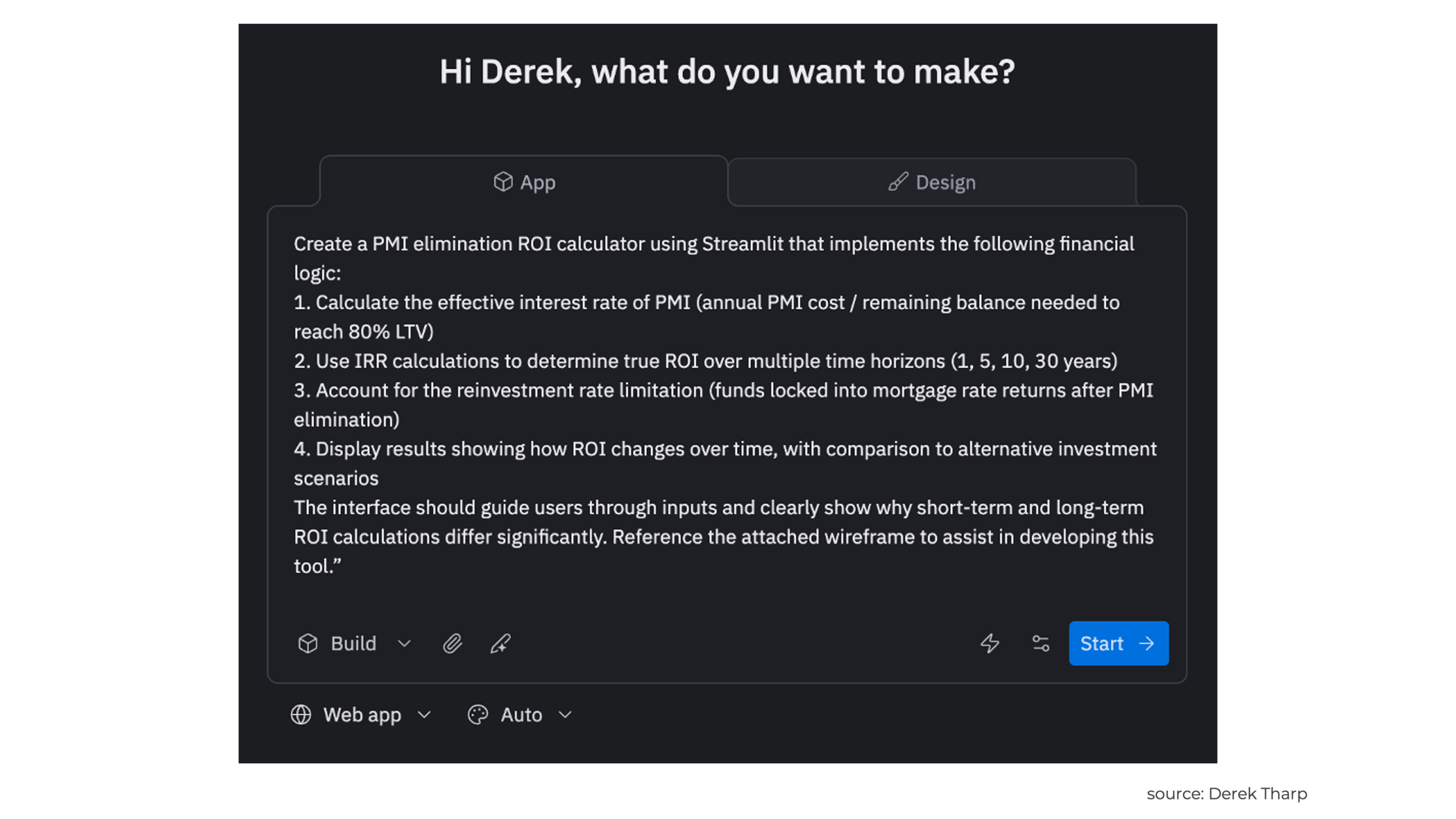
Once the wireframe provides a clear visual roadmap, we can move to Replit to build the actual tool. Consider the following initial Replit prompt:
"Create a PMI elimination ROI calculator using Streamlit that implements the following financial logic:
- Calculate the effective interest rate of PMI (annual PMI cost / remaining balance needed to reach 80% LTV)
- Use IRR calculations to determine true ROI over multiple time horizons (1, 5, 10, 30 years)
- Account for the reinvestment rate limitation (funds locked into mortgage rate returns after PMI elimination)
- Display results showing how ROI changes over time, with comparison to alternative investment scenarios
The interface should guide users through inputs and clearly show why short-term and long-term ROI calculations differ significantly. Reference the attached wireframe to assist in developing this tool."
Here is a screenshot of that initial step kicking off the project:
And here is an example of what the interface looks like while it is working. Note that a chatbot conversation is on the left-hand side of the screen and a live preview of the app is on the right-hand side of the screen:
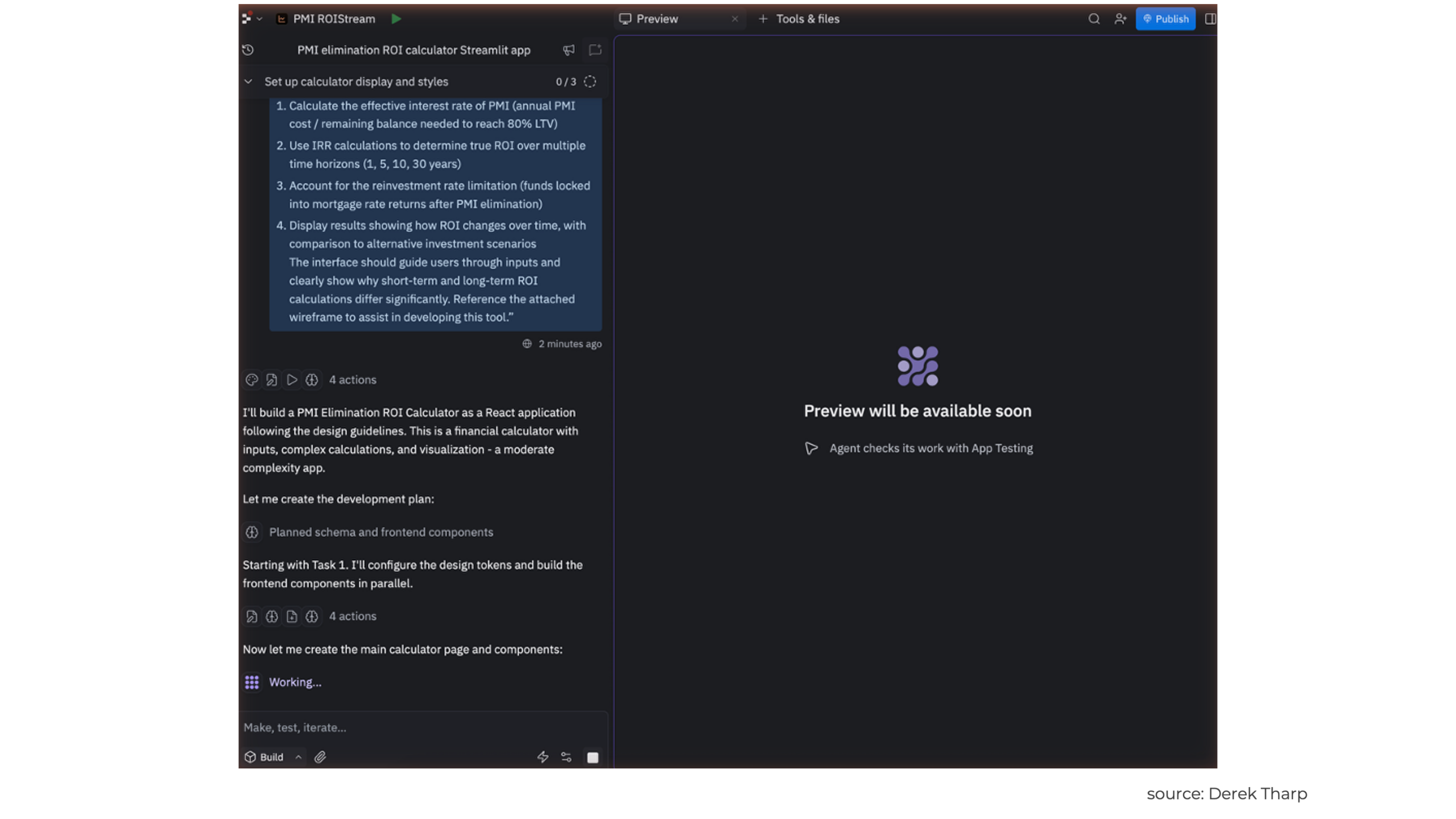
Notice that this prompt combines specific financial planning logic with implementation guidance. The prompt doesn't just ask for "a PMI calculator" – it specifically references the key insight that makes this tool valuable (the time horizon effect on ROI). This will generally help get better results from prompting a tool like Replit.
Step 4: Iterative Refinement Through Conversation
As you can see in the screenshot below, Replit didn't get this perfect on the first try, and even if the functionality were perfect, it is unlikely the UI will be exactly what you are looking for.
In this case, Replit didn't fully understand the need for tracking home equity in getting an all-encompassing ROI calculation, so our ROI calculations were not correct. Furthermore, Replit didn't quite understand the need to compute the IRR based on total cash flow differences between two scenarios (see Kitces post for technical details), but we'll be able to resolve this through some additional chatting with Replit.
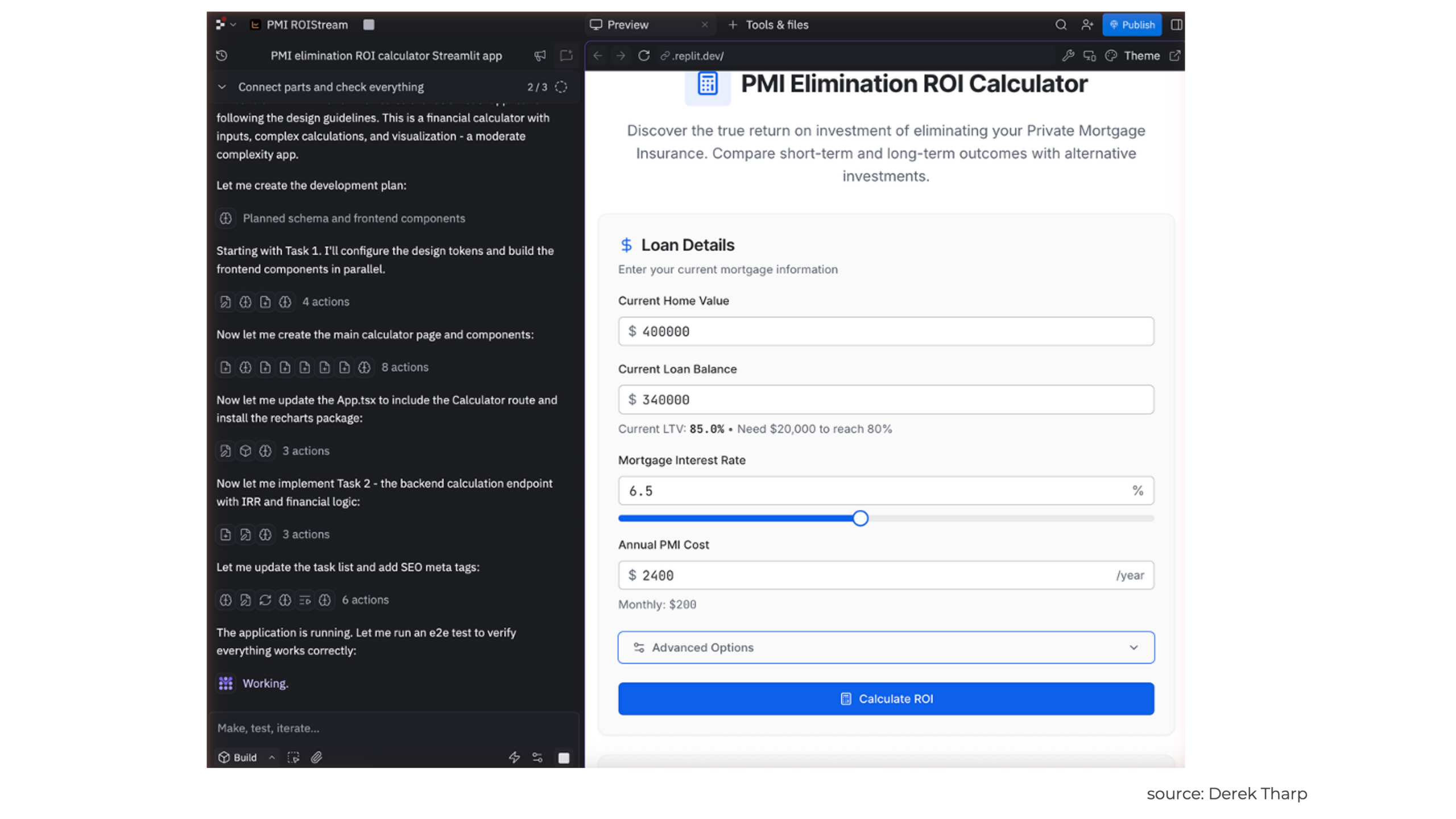
And this is where vibe coding really demonstrates its power. As the AI generates the initial tool, you can refine it through natural conversation. For our purposes here, the following dialogue is simply illustrative for example purposes, but consider the following hypothetical back-and-forth to refine the tool in Replit:
Round 1 Refinement: "These IRR calculations are not quite right. You need to track and account for home equity (and inflation on home equity) as part of the long-term ROI calculation. It will be helpful to have a table displaying year-by-year cash flows, as well as a delta between the pre-payment and non-pre-payment scenarios that you can then calculate an IRR from. See this post for more detailed information on these calculations: https://www.kitces.com/blog/eliminating-private-mortgage-insurance-pmi-principal-preayment-downpayment-80-ltv/"
Round 2 Refinement: "The calculator is working, but I need it to more clearly show why the ROI decreases over longer time horizons. Can you add a chart that visualizes how the blended rate effect works – showing higher returns during PMI years and lower returns afterwards?"
Round 3 Refinement: "Perfect! Now can you add a comparison table that shows the cumulative wealth difference between prepaying PMI versus investing in a portfolio at different assumed rates of return? I want users to see actual dollar impact, not just percentages."
Round 4 Refinement: "The math is solid, but can you add explanatory text that helps users understand what they're seeing? Something that explains why a 9% single-year ROI might only translate to a 5% long-term ROI."
The way LLMs work, even following the exact same inputs is not guaranteed (or even likely) to generate the exact same outputs in successive attempts, so any revision and refinement discussion will be inherently iterative and need to depend on a case-by-case basis, but hopefully the dialogue above gives some perspective for the types of feedback that could be common.
Step 5: Adding Professional Polish (Optional)
Once the core functionality works, you can enhance the tool's professional appearance. Of course, consider the intended purpose of a tool. If it is an internal tool and you don't need any polish, then you might want to consider whether additional edits are worth it. "If it ain't broke, don't fix it" can certainly apply to AI coding, and it is certainly possible that a fix to a user interface could accidentally cause something else to break in the process.
However, there are certainly times when we will want to dress something up to be a better client-facing tool, and in that case, we might consider prompts like the following: "Make this look like a tool that a financial advisor would be comfortable sharing with clients. Use a professional color scheme appropriate for financial planning, add clear section headers, and ensure the layout works well on both desktop and mobile devices."
Furthermore, for compliance purposes, we also might need to add a disclaimer or other firm-specific compliance text: "Add a disclaimer section explaining that this is for educational purposes and that individual situations may vary."
Ultimately, after going through this iterative refinement process, we may have a final product that looks something like this (live version here):
Step 6: Real-World Testing And Validation
One important (and easy to overlook) step in using AI is validating the actual results provided. This is highly relevant to the "Fiduciary Catch 22". Advisors using AI tools do have a fiduciary duty to ensure that the results are valid and accurate. An advisor couldn't, for instance, use a PMI repayment ROI calculator that gives false results and then just say, "Oops, AI made this, I didn't realize it wasn't working properly". That sort of carelessness would be a violation of their fiduciary duty.
As a result, it is important for advisors to test and validate the tools they are using. Perhaps the easiest way to do this is to test against scenarios that advisors know are accurate. For instance, suppose an advisor has a manual spreadsheet calculation that they are trying to build into a tool, but they also have hundreds of sample scenarios generated by the spreadsheet. Testing against a sampling of these to ensure the same results (or results that would only differ in expected ways, such as additional features added to the new tool) is one way to try to validate a tool.
In this case, since I have already published a Nerd's Eye View article on the ROI of PMI elimination, we could use scenarios from that article for some initial testing. For instance, we could use a $200,000 mortgage at 4.5% with $1,200 annual PMI, and verify that we get similar IRR results over different time horizons as I did in that article. Depending on the nature of the tool and the different ways results could differ, we likely would want to do some additional testing, but this will always vary on a case-by-case basis.
Step 7: Deployment
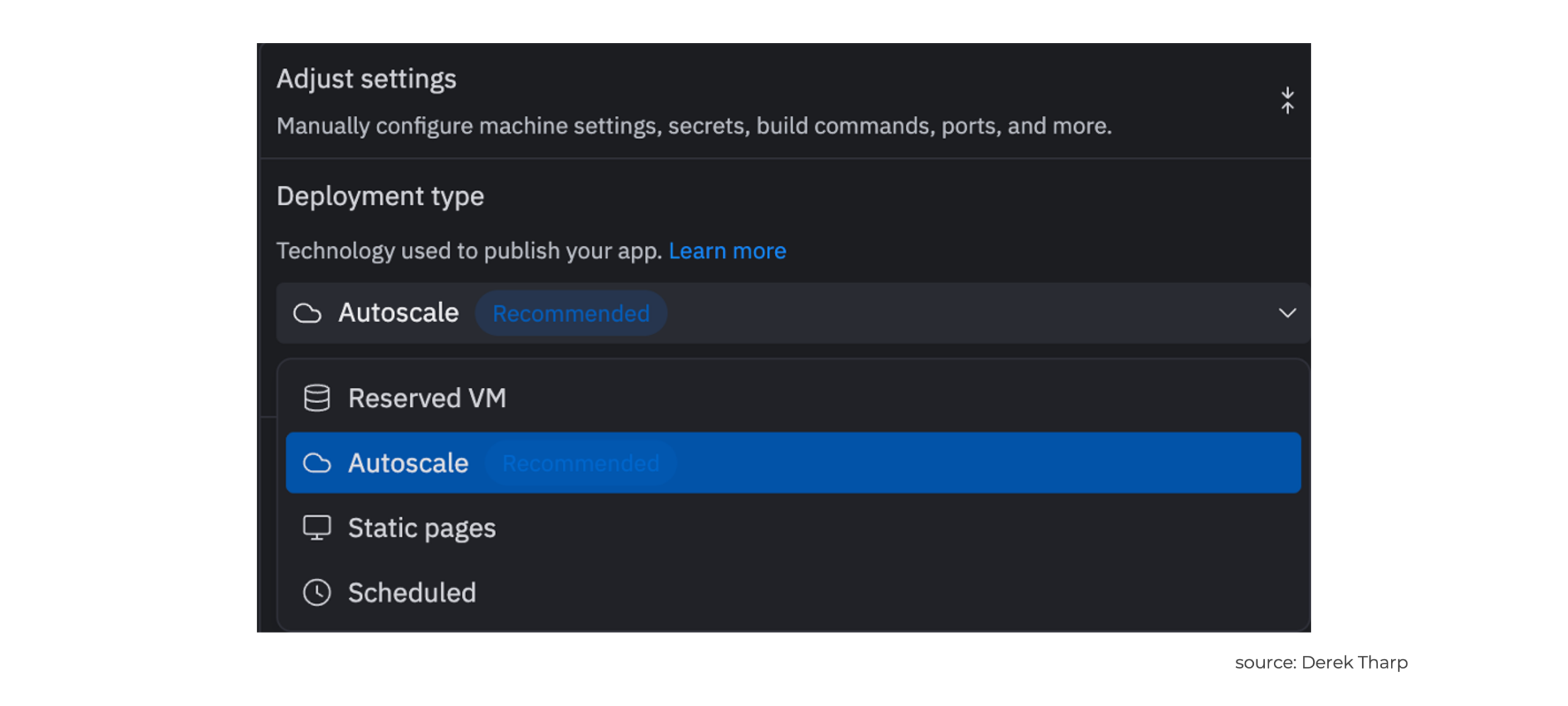
Once you've built a vibe-coded tool, the next critical decision is how to deploy it. Deployment matters more than you might think. Pick the wrong method and you'll either overpay or frustrate users with a clunky experience. The technical side of deployment usually trips up non-coders, but Replit makes it manageable. Replit offers four deployment options built right into the app, each designed for different needs and budgets. And if Replit doesn't work for your situation, there are plenty of other hosting options for advisors with specific requirements.
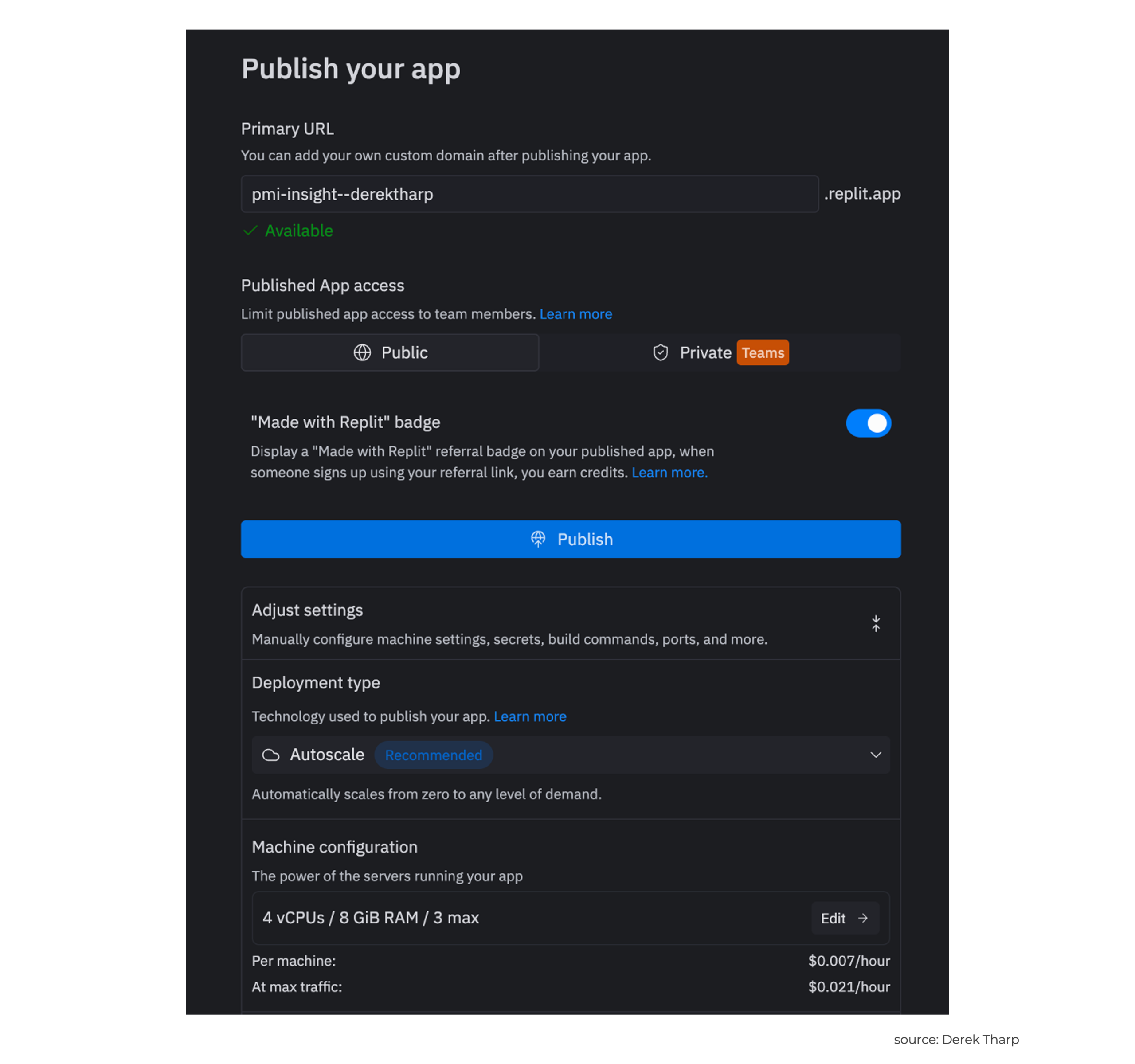
Understanding these options upfront can save significant time and frustration later, particularly since the "quick and easy" deployment that works for initial testing may not be appropriate for client-facing tools that need professional reliability.
Replit's Native Deployment Options
Replit has simplified the deployment process by offering what they call "deploy where you code" – meaning you can go from building a tool to having it live on the internet without ever leaving their platform. All deployments are hosted in the United States on Google Cloud Platform infrastructure, which addresses many of the security and reliability concerns advisors might have.
Static Deployments: The Starting Point For Most Advisor Tools
Static deployments provide free hosting up to 100 GiB of outbound data transfer for Replit Core users, with a free single static deployment. This is great for tools that don't require server-side processing – essentially calculators that run entirely in the user's browser.
For our PMI calculator example, a static deployment would work well if we built it using HTML, CSS, and JavaScript rather than Python with Streamlit. The entire calculation would happen in the user's browser, meaning there's no ongoing server cost and the tool loads quickly for users.
Static deployments are great for simple calculators, client education tools, or any advisor resource that presents information without the need to store data or perform complex server-side calculations. If your tool can work without an internet connection once it's loaded, static deployment is probably appropriate.
Autoscale Deployments: The Sweet Spot For Interactive Tools
Autoscale deployments start at $1/month base fee with Replit Core, plus usage-based billing that scales from zero up to any level of demand. This is where tools like our Streamlit PMI calculator would typically live, since they require server-side Python calculations.
The benefits of autoscale are that when your app is idle, it reduces the number of servers to as low as zero to save money, but automatically adds servers when your app is busy. For advisors, this means you're not paying for computing power when no one is using your tool, but the tool automatically scales up if you share it widely or if it gets heavy use during client meetings.
To provide a real-world cost example, Replit tested its infrastructure by sending 2.5 million requests to a blog, and the total cost was only $0.94. For most advisor tools, monthly costs will likely be under $5 unless you're serving thousands of users.
Autoscale deployments work great for tools that require server-side calculations, database storage, or real-time data processing. This could include Monte Carlo simulators, tax planning tools, or anything built with frameworks like Streamlit.
Reserved Virtual Machine (VM) Deployments: For Mission-Critical Tools
Reserved VM deployments start at $20/month with Replit Core and provide 99.9% uptime with dedicated computing resources. Unlike autoscale deployments, reserved VMs offer predictable costs and performance without interruptions.
This option makes sense for advisors who have built tools that are central to their practice operations – perhaps a tool that incorporates a lightweight client portal or a complex planning tool that multiple team members access throughout the day. The higher cost provides the reliability that client-facing applications require.
Reserved VM deployments may also be necessary when tools that are integral to daily operations, where downtime would affect your ability to serve clients. Furthermore, VM deployments may be appropriate if you need consistent performance for complex calculations or if you're storing sensitive client data that requires dedicated infrastructure.
Scheduled Deployments: For Background Automation
Scheduled deployments are probably the least commonly needed option for most advisor use cases, but they can be valuable for building tools that automate routine tasks. Scheduled deployments start at $1/month with Replit Core and run applications at predetermined time intervals.
A scheduled deployment could make sense for a script that automatically carries out a task such as downloading market data each morning, generating monthly performance reports, or checking for regulatory updates and sending summaries to your email. Think of this as replacing manual tasks that you currently do regularly, but that could be automated. However, at this point, depending on what you'd like to accomplish, there may be easier ways to automate many tasks, such as using features like "Scheduled Tasks" in ChatGPT or setting up your own automated processes using Zapier.
Beyond Replit: Alternative Deployment Strategies
While Replit's integrated approach elegantly handles most advisor needs, there are situations where alternative deployment methods, such as self-deployment, may be worth considering. Potential scenarios where self-deployment could make sense include advisors with IT staff who can handle deployment, compliance requirements that demand it, or maybe they just want total control over their infrastructure. In those situations, services like Amazon Web Services (AWS), Google Cloud, and Microsoft Azure are all options to consider. But it is important for advisors to know what they're getting into by going this route. The technical expertise required jumps up significantly, as does ongoing maintenance.
The trade-off hits hard. Yes, you control every security setting and piece of data, but now you're on the hook for everything. Server maintenance, security patches, software updates, troubleshooting when things break at 2 AM… It adds up fast. For most solo advisors or small teams, this level of complexity likely far outweighs the benefits, at least for simple apps or calculators.
However, even for advisors with such resources, there can still be use cases for vibe coding a version one of an app or tool. While it is likely that professional developers may suggest essentially starting over from scratch to build a tool for reasons such as making foundational decisions that will help with scaling the app long-term, having a working prototype to build from can make the process much easier than essentially trying to communicate a vision to a human team of developers and iterating through multiple versions of the tool. AI coding assistants may miss some nuance that professional developers don't, but computers are far faster at building prototypes and are available 'on-demand' to assist. For instance, an advisor on a flight could tinker with an app and vibe code their way to a working version one of a tool in a way that they never could working with a human developer. This can get an advisor from ideas to a working tool much faster, and advisors can then decide how to proceed further with the tool.
Ultimately, while vibe coding has some significant limitations, and advisors have to be careful about how it is used, there is a wide array of use cases that could be very beneficial, particularly for advisors without the teams or resources previously needed to develop specialized tools. While tools like Replit can perform impressively, even for those without much technical knowledge, advisors who invest in building some technical foundation to better communicate with AI coding assistants can give themselves a tremendous advantage for building useful tools. As Sean Grove argued, "The person who communicates most effectively [will be] the most effective programmer", and advisors with deep niche knowledge may ultimately prove to be some of those most effective programmers of the future.





Leave a Reply